
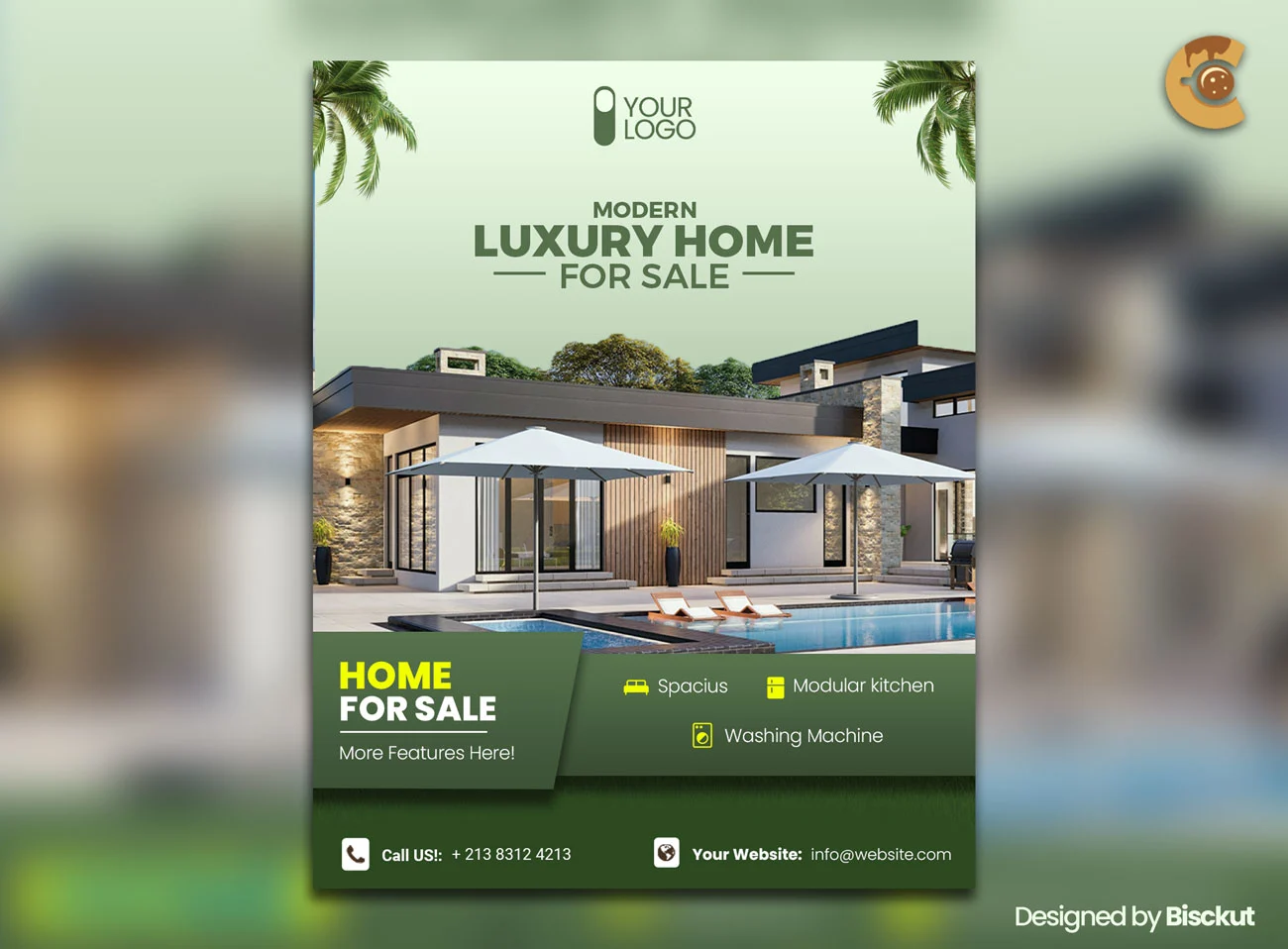
Description
A beautiful property photo gets attention. Clear listing information helps someone decide what to do next.
This Free Real Estate Flyer Template PSD gives agents, brokers, agencies, and property marketers a clean layout for promoting homes for sale, open houses, and other residential listings.
The PSD is created in RGB colour mode, making it naturally suited to email campaigns, social media, property websites, and online advertising. Smart Object layers allow you to replace property photos and customise the text, colours, branding, and contact details in Adobe Photoshop.
Show the Property in the Right Order
People usually scan a property flyer before they read it.
Make the most important information easy to find:
- What type of property is it?
- Where is it located?
- What is the price?
- What are the key specifications?
- How can someone arrange a viewing or get more information?
The exact order may change depending on the listing, but buyers shouldn’t need to search through the design for basic facts.
Key Features
- Fully editable PSD template
- RGB colour mode
- Smart Object support
- Replaceable property images
- Customisable text and colours
- Editable agency branding
- Modern real estate layout
- Suitable for digital marketing
- Free for personal and commercial use
- No attribution required
Best For
This template can be adapted for:
- Houses for sale
- Open house events
- Apartment listings
- Real estate agent promotions
- Property advertisements
- Residential developments
- Agency marketing
- Social media campaigns
- Email promotions
- Online listing graphics
Designer Tip
Don’t choose the hero photo just because it is the widest image.
Choose the image that answers the biggest question about the property.
If the main selling point is the architecture, lead with the exterior. If buyers are likely to care most about the renovated interior, sea view, large garden, or luxury kitchen, consider making that feature more prominent.
The first image should communicate the strongest reason to explore the listing.
Use Fewer, Better Property Photos
A flyer doesn’t need to show every room.
Choose a small group of images that reveal different parts of the property.
For example:
- Main exterior
- Living space
- Kitchen
- Primary bedroom
- View or special feature
Avoid using several photos that show almost the same angle.
The flyer should create interest and provide enough context to encourage the next step. A complete property gallery belongs on the listing page.
Make the Specifications Easy to Scan
Bedrooms, bathrooms, parking, and property size are practical decision-making details.
Keep them together in a clear section.
Use familiar labels or icons, but don’t rely on decorative symbols that could be misunderstood. The information should remain readable even when someone views the flyer on a phone.
Depending on the market and property type, useful details may include:
- Bedrooms
- Bathrooms
- Property size
- Lot size
- Parking
- Property type
- Year built
Include only the information that is accurate and relevant to the listing.
Give the Price Proper Context
If the price is included, make sure it is current.
Clearly indicate when the amount is a starting price, guide price, rental rate, auction figure, or another type of pricing.
Don’t use a large number without explaining what it represents.
Property prices and availability can change. Update the flyer when the listing status changes instead of continuing to circulate outdated promotional material.
Open House Flyers Need Different Priorities
If the flyer promotes an open house, the viewing information may be more important than a long list of property features.
Make the following details easy to find:
- Date
- Start and end time
- Property location
- Registration requirements
- Agent contact information
If visitors need to book in advance, say so clearly.
An open house flyer should help someone arrive at the right place at the right time—not just admire the property.
Keep Agent Branding Visible but Secondary
The property should remain the main focus.
Include the agent or agency logo, name, contact details, and other required information, but don’t allow the branding to compete with the listing itself.
The flyer should feel connected to the agency while still giving the property enough visual space.
Use the same brand colours, typography, and logo treatment across listings to create recognition over time.
Use Accurate Property Information
Before publishing, verify every factual detail.
Check:
- Address
- Price
- Bedroom count
- Bathroom count
- Property size
- Viewing date
- Contact number
- Email address
- Listing status
If a feature isn’t confirmed, don’t add it because it makes the flyer more attractive.
A property flyer is promotional material, but it still needs to represent the listing accurately.
Create a Clear Next Step
Tell interested buyers or renters exactly what to do.
Depending on the campaign, this may be:
- Call the agent
- Book a viewing
- Visit the full listing
- Scan a QR code
- Register for the open house
- Send an enquiry
If you add a QR code, link it directly to the relevant property page rather than a generic homepage whenever possible.
The fewer steps between interest and information, the better.
Digital and Print Use
The PSD is created in RGB colour mode, making it naturally suited to online marketing.
Use it for email campaigns, social media promotions, website graphics, and digital property advertising.
If you need a printed version, confirm the required colour profile, dimensions, bleed, resolution, and export settings with the printing service before preparing the final artwork.
Technical Details
- File Format: PSD
- Colour Mode: RGB
- Editing: Smart Objects and layered elements
- Editable Elements: Photos, text, colours, and branding
- Software Required: Adobe Photoshop
- Best For: Property listings and open house promotions
- License: Free for personal and commercial use
- Attribution: Not required
This real estate flyer works best when it makes the property easy to evaluate. Lead with the strongest feature, organise the essential facts clearly, keep every listing detail current, and give interested people a direct way to arrange the next step.



Reviews
There are no reviews yet.