Best AI Tools for Graphic Designers in 2026 (That Actually Save You Time)
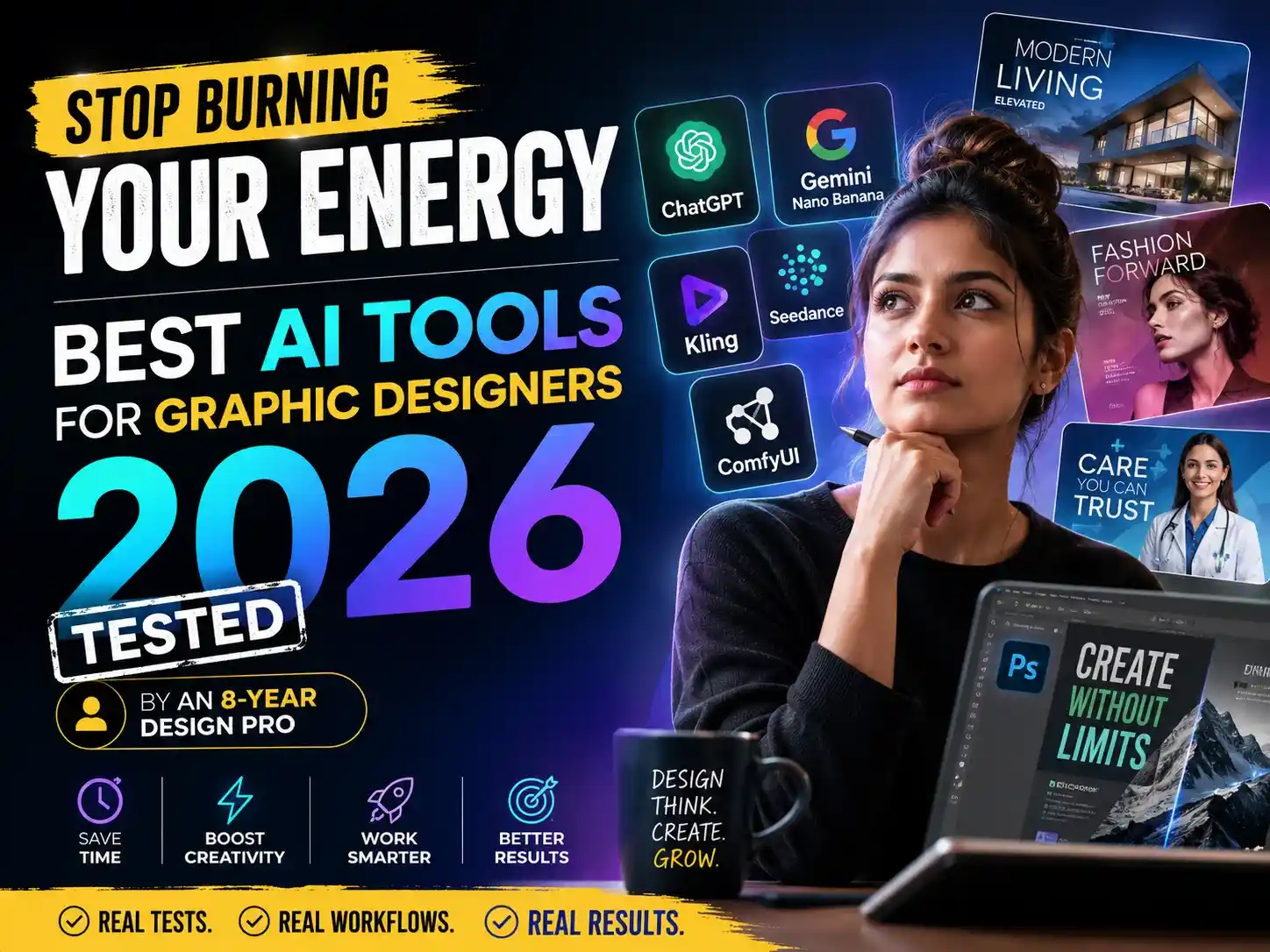
in Ai Marketing on May 10, 2026Quick answer: The best AI tools for graphic designers in 2026 are ChatGPT (image generation), Google Gemini Nano Banana, ComfyUI (open source), Kling and Seedance (for video). But honestly? The tool is maybe 20% of the work. The other 80% is still your brain.
1. Why Most AI Tool Lists Are Useless
I have been designing professionally for 8 years.
Real estate companies, fashion shows, medical brands — I have worked with all of them. Helped them grow organically through branding, social media design, and content strategy. Real conversions happened. Not just pretty designs.
So when I read most “best AI tools for graphic designers” articles, I get genuinely frustrated.
Because most of them feel like someone tested a piece of AI design software for two hours, took a screenshot, and hit publish—same 10 tools, same order, same generic lines every single time.
Nobody tells you:
- Which AI-powered design tools are actually safe for client work commercially
- What to do when your AI image generator credits run out mid-project
- Why your AI-generated logo looks generic — and how to fix it
- How to build a real AI creative workflow — not just use a tool once and move on
- How to prompt differently depending on the industry you are designing for
This post is different. Everything here comes from real projects, real clients, and 8 years of design thinking applied to generative AI for designers.
Let’s get into it.
2. My Actual Stack — What I Use Every Day
These are the exact tools in my daily workflow. No sponsored recommendations — just what I genuinely use.
AI Image Generators & Poster Design
ChatGPT (GPT-4o image generation) My first choice for almost everything: poster design, marketing visuals, typography-heavy work. What I love most about it is that it does not “ghost” your prompt. It understands context, picks up on nuance, and has gotten significantly better at typography accuracy in 2026. As a text-to-image AI tool, it is the most natural to use — you type the way you think. The one condition: your prompt needs to be strong. I will cover that in its own section below.
Google Gemini Nano Banana (Pro) My go-to for hyper-realistic visuals. Fashion, editorial, high-end brand visuals — Gemini is sharp here. I use both ChatGPT and Gemini depending on the mood and style a project needs. They have different strengths, and I treat them as two different AI art tools for two different jobs.
Advanced / Custom Work
Video & Motion Content
- LTX 2.3 — My free pick for AI video generation. The quality genuinely surprised me. Solid for short motion content.
- Kling — Paid, but the quality-to-price ratio is the best I have found for client video deliverables.
- Seedance — Best when you need consistent character motion and brand-aligned video assets.
Research & Strategy
- Claude AI — Deep competitor research, brand strategy, and content planning. When I am building AI branding tools into a client workflow, this is where the strategy starts.
- Gemini AI — Content ideation, trend research, and quick analysis.
3. Best Tool for Each Use Case
Most articles dump all tools into one list and leave you to figure it out. I am not going to do that.
Here is a clean breakdown of what you actually need to get done:
| Use Case | Best Free Option | Best Paid Option |
|---|---|---|
| Poster & marketing design | ChatGPT (free tier) | ChatGPT Plus / Gemini Pro |
| Social media graphics | Canva AI | Gemini Nano Banana Pro |
| Logo concepts & references | ChatGPT, Flux | Adobe Firefly |
| Background generation | ComfyUI (Stable Diffusion) | ChatGPT Plus |
| Video / motion content | LTX 2.3 | Kling, Seedance |
| Brand research & strategy | Claude AI (free) | Claude Pro |
| Content planning | Gemini (free) | Gemini Advanced |
| Image upscaling | Let’s Enhance (free tier) | Magnific |
One important note on logos: I personally recommend finalizing every logo in a vector-based software like Adobe Illustrator or CorelDRAW. Use AI for references, mood boards, and concept exploration — but the final mark should be built manually. AI logos tend to come out generic unless your prompt is exceptionally detailed. And raw AI output is rarely print-ready. Explain this once to your client — they will understand.
4. Free vs Paid — Pick Your Stack by Budget
Just Starting? (Free Stack)
Start with one tool. Just one.
- ChatGPT (free tier) — Start here. It is the most beginner-friendly AI image generator available right now. Understands natural language prompts and gives usable output even without expert-level prompting skills.
- Gemini (free) — Pair it with ChatGPT. They have different strengths — together they cover a lot of your AI creative workflow needs.
- ComfyUI + Flux or SDXL — Free, powerful, slightly technical. Search YouTube for “ComfyUI beginner setup” — takes about 2 hours to get running and then it is unlimited. This is one of the best free AI art tools available today, period.
- Canva (free tier) — For quick AI tools for social media design, Canva has built-in features that are easy and fast.
One honest tip: Do not try 10 tools at once. Learn ChatGPT deeply first. Once you understand how prompting works — every other AI-powered design tool becomes easier because the logic is the same.
Freelancer / Professional Stack (Paid)
- ChatGPT Plus (~$20/month) — Worth it. Higher generation limits, better image quality, access to the latest models.
- Gemini Nano Banana Pro — My daily driver for client work. No compromise on output quality.
- Kling or Seedance — If you are producing video content for clients, one of these is necessary.
- Adobe Firefly (via Creative Cloud) — If you already use Adobe tools, Firefly integrates seamlessly. It is also the safest option commercially — especially when bigger clients start asking about IP rights.
5. The Designer Brain Method — Learn to Prompt, Not Just Use the Tool
The biggest mistake designers make with AI is this: they open an AI image generator, type a generic command, get a generic result, and say, “AI is not useful.”
No. The prompt was not useful.
A bad prompt looks like this:
“Design a poster for my racing company.”
You will get a beautiful poster. But it will look like every other racing poster that already exists on the internet. Generative AI for designers gives you the average of everything it has been trained on. You did not push it away from average.
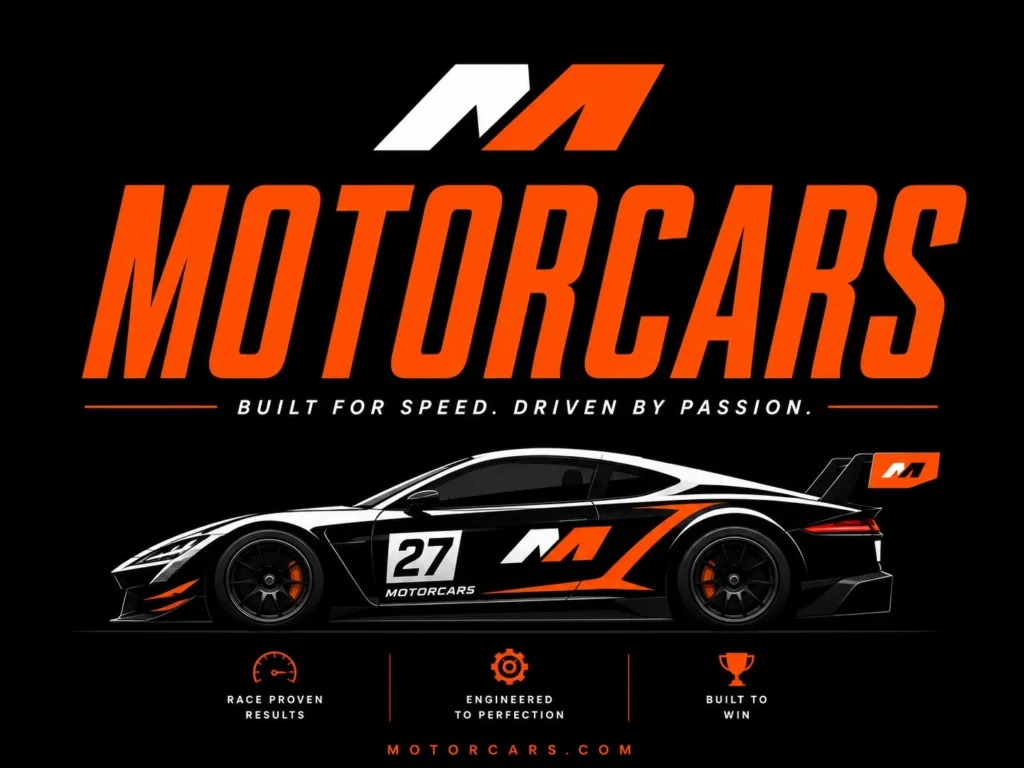
Clean Yes. Professional looking, sure.
But completely forgettable. This could be any racing brand, anywhere in the world.
No personality. No energy. No brand story.
This is what AI gives you when you give it nothing to work with.
Here is how I actually prompt:
“Create an energetic poster for a motorsport brand. Use bold condensed fonts like Impact or Bebas Neue for the main heading. Color palette: deep black background, electric orange #FF6B00, chrome silver accents. Motion blur effect on the car. Gritty texture overlay on the background. Speed lines radiating from the vehicle. Typography style — aggressive and editorial. No gradients, flat graphic treatment only.”
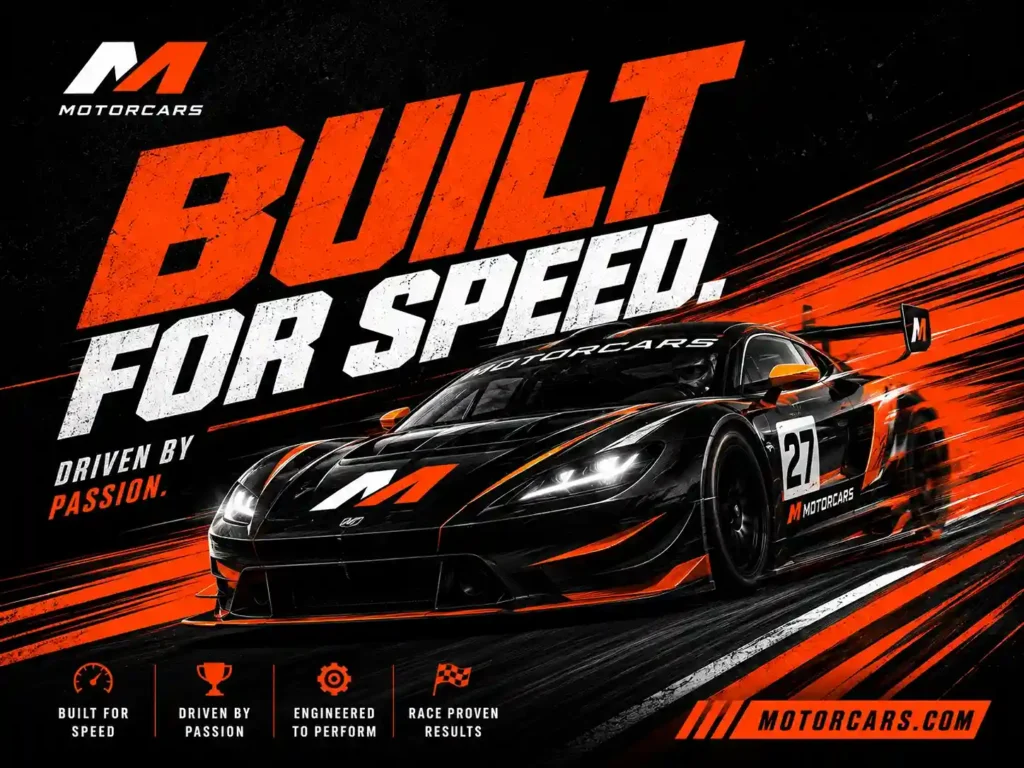
Bold condensed type. Orange + black palette. Gritty texture. Speed lines. Motion blur.
This is what happens when a designer prompts AI — not just a regular user.
Same tool. Completely different result.
[See the real before/after comparison images in this post — both generated with ChatGPT, only the prompt changed.]
The Designer Brain Prompting Framework — always specify these 5 things:
- Typography — Font style (condensed, serif, handwritten), weight (bold, light), character (aggressive, elegant, playful)
- Colors — Give hex codes or at minimum describe the emotional tone (warm, corporate, energetic, clinical)
- Texture and Depth — Grunge, clean, editorial, minimal, layered
- Elements to include — Specific objects, shapes, graphic elements you want present
- What to avoid — This is often more important than what to include
Text-to-image AI tools rely on data. They will always give you “the average of everything they have seen.” Your job as a designer is to push them away from average. Only a designer’s thought process can do that.
This is the real difference between AI productivity for designers and just casually using an app.
6. The AI + Photoshop Hybrid Workflow {#hybrid}
Most beginners never hear about this one. And almost no article covers it properly.
The problem: Even the best AI-powered design tools have generation limits. Mid-project, you can run out of credits — and you cannot regenerate endlessly.
My solution: Use AI to generate the base. Import it into Adobe Photoshop. Refine it there.
You get the best of both:
- AI handles the heavy lifting — background generation, initial layout, complex visual elements
- Photoshop handles the precision — masking, typography finessing, color correction, brand consistency
For a collage-style social media post with 3 to 4 visuals, my actual AI creative workflow is:
- Generate each visual element separately in ChatGPT or Gemini with precise prompts
- Import all elements into Photoshop as separate layers
- Use Photoshop’s built-in AI tools (Generative Fill, Remove Background) for seamless blending
- Finish typography, brand colors, and final layout manually
That is where graphic design automation gets real. AI builds the raw material, you assemble and refine it like a professional.
The output looks polished and human. It does not have that obvious AI-generated feel — and that matters when you are delivering to clients.
7. Copyright and Commercial Safety
This is a question every professional designer should be asking. And almost no article properly answers it.
The short answer: Most major AI design software in 2026 generates commercially safe content. But you still need to read the tool’s terms of service.
Tools I personally use for client work and consider safe:
- ChatGPT image generation — OpenAI’s terms allow commercial use of generated outputs
- Gemini Nano Banana Pro — Google’s commercial terms cover generated content
- Adobe Firefly — Trained on licensed Adobe Stock content. The safest AI-powered design tool for commercial use, especially when large clients ask about IP rights
Tools to be careful with:
- Open source models through ComfyUI — Safety depends on which specific model you are using and how it was trained. Fine for personal work or portfolio. Always research the model’s license before delivering to a client.
- Free tier tools with unclear terms — Always read before using for commercial purposes.
My practical rule: If a client is corporate, enterprise, or in a legally sensitive field like medical, legal, or finance, use Adobe Firefly or ChatGPT Plus. If a client is a small business or startup, most tools will be fine.
Across 8 years and all my client work using ChatGPT and Gemini for commercial projects, I have not had a single copyright issue. But that is not because I trusted blindly — it is because I read the terms.
8. Is AI Replacing Graphic Designers? My Real Answer
I will be direct: No. AI is not replacing graphic designers.
But it is replacing designers who refuse to learn AI.
Those are two very different things.
Generative AI for designers relies on data. It gives you the average of everything it has ever seen. A good design is not average — it is unexpected, emotionally resonant, strategically aligned with a brand, and built from a deep understanding of the specific audience it needs to reach.
That requires a designer’s brain. No AI design software can replicate:
- Understanding what a brand truly stands for beneath the surface
- Knowing when to break design rules for maximum impact
- Reading the emotional tone a client wants but cannot articulate
- The strategic thinking behind which colors, fonts, and layouts drive conversions for a specific industry
What AI can do is dramatically reduce your execution time — so you can spend more energy on everything above.
I used to manually search and source background images and stock photos for every single project. That is completely gone now. One prompt into an AI image generator and I get exactly what I need in minutes. That saved time goes directly back into strategy, client communication, and creative thinking.
AI productivity for designers is real. And the market is already responding — companies are actively hiring designers who know how to use these tools efficiently. It is now an expected skill. If you are a designer not using AI, you are working harder than you need to and falling behind.
9. Before AI vs After AI — My Actual Numbers
Here is what actually changed in my day-to-day workflow after building a proper AI creative workflow:
| Task | Before AI | After AI |
|---|---|---|
| Background sourcing | 20–30 min searching stock sites | 2 min — prompt and generate exactly what I need |
| Initial brand concept | 2–3 hours research + sketching | 45 min — AI helps with competitor analysis and mood boards |
| Single social media post | 45–60 min | 15–20 min |
| Client content strategy | Half a day | 1–2 hours with Claude + Gemini for research |
| Full brand kit | 2–3 days | 1 day with AI-assisted workflow |
The biggest impact? Content consistency for social media clients.
Here is a real example from a real estate client I worked with:
I shifted the entire content workflow to AI-assisted, using AI branding tools and AI tools for social media design together:
- Claude AI for content planning and research
- Gemini for captions and copy strategy
- ChatGPT for generating property lifestyle visuals
- My design expertise for layout, brand alignment, and final execution
The result was consistent posting that built a real audience and drove actual client conversions. The content connected because it was strategically designed — not just aesthetically pleasing. AI gave us the speed to stay consistent. Design thinking gave us the quality that converted.
Frequently Asked Questions
Which AI tool is best for graphic design in 2026?
GPT Image 2 (GPT-4o) and Google Gemini Nano Banana are currently the strongest all-around AI tools for most graphic designers. For advanced custom workflows, ComfyUI with open-source models offers unmatched flexibility at zero cost.
Can AI do graphic design for free?
Yes. ChatGPT free tier, Google Gemini (free), and ComfyUI with Flux or SDXL are all free and produce professional-quality output — as long as your prompting is skilled.
What AI tools do professional designers actually use?
Most use a mix — ChatGPT or Gemini as their primary text-to-image AI, Adobe Firefly for commercially safe client work, ComfyUI for advanced outputs, and Kling or Seedance for video.
Is AI replacing graphic designers?
AI is not replacing designers — it is replacing designers who do not learn AI. Core skills like brand strategy, creative direction, and visual problem-solving still require human expertise. AI handles execution speed. Designers handle strategy and judgment.
How do I use AI in my graphic design workflow?
Start with ChatGPT. Learn to prompt with specifics — fonts, hex colors, textures, what to avoid. Once you have clean AI outputs, bring them into Photoshop to finish. That is your baseline workflow right there.
Which AI design tools are safe for commercial client work?
Adobe Firefly, ChatGPT (OpenAI commercial terms), and Google Gemini all allow commercial use of generated content. Always read the specific tool’s terms of service before delivering AI-assisted work to any client.
What is the best free AI tool for logo design?
Use any AI image generator for logo concept exploration and references — but always finalize your logo manually in a vector software like Adobe Illustrator. AI logos tend to be generic unless your prompt is exceptionally detailed, and raw AI output is rarely print-ready.
How does AI help with graphic design automation?
AI automates the time-consuming parts — background generation, sourcing reference images, creating multiple layout variations, and building first drafts. This frees up your time for the strategic and creative decisions that actually require a designer’s brain.
Final Thought
If you are a designer not using AI tools yet, you are burning energy you simply do not need to burn.
The time you save on execution through graphic design automation and AI-powered design tools is time you can invest in learning, in client strategy, in building the kind of deep expertise that no AI can ever replicate. Every designer needs to make this shift — not because AI is the future, but because AI is already the present.
Start today. Pick one tool. Learn it deeply. The rest will follow.