
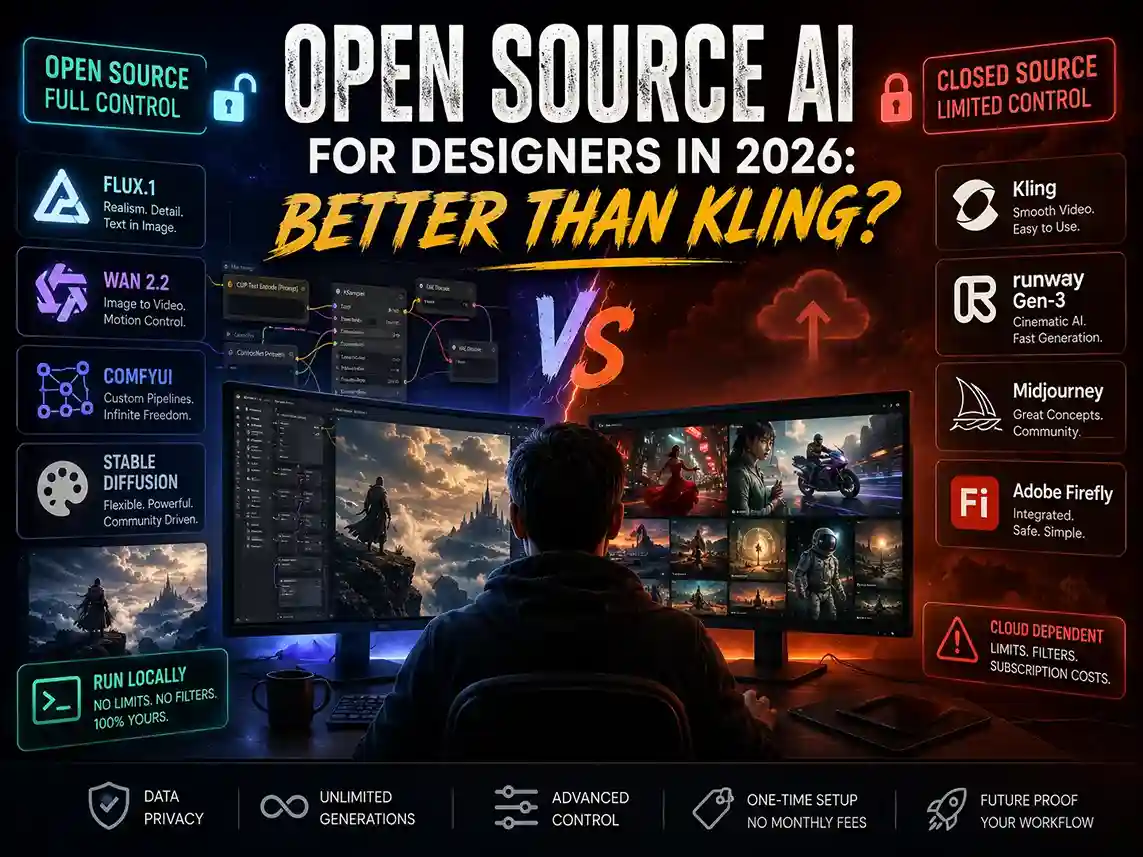
Open source AI models like FLUX.1, Wan 2.2, Stable Diffusion, and ComfyUI are becoming serious alternatives to Midjourney, Runway, Seedance, Kling and Adobe Firefly for graphic designers and motion artists in 2026. This guide breaks down exactly when they win, when they don’t, and how to get started without wasting weeks on the wrong setup.
Let me be straight with you.
If you search for open source AI tools right now, you’ll find dozens of articles listing model names, quoting benchmarks, and telling you to “explore the ecosystem.” None of them will tell you whether these tools actually deliver on a real project with a real client breathing down your neck.
I’ve used both sides. Paid tools like Kling, Midjourney, Runway Gen-3, and Adobe Firefly. And local AI workflows built on Wan 2.2, FLUX.1, LTX Video, and ComfyUI. I’ve burned credits on cloud tools that failed me at 11 PM before a deadline. I’ve also run 15 free local generations to nail a shot that no paid tool could produce at any price.
So here’s the honest answer: Yes, open source AI is not just relevant in 2026 — in specific areas, it’s ahead of every paid tool on the market. But which area and for whom matters a lot.
This article is specifically for graphic designers, motion creators, and visual artists who want to know if this world is worth entering.
What “Open Source AI” Actually Means
Before we go further, let’s clear up a confusion that even top-ranking articles keep getting wrong.
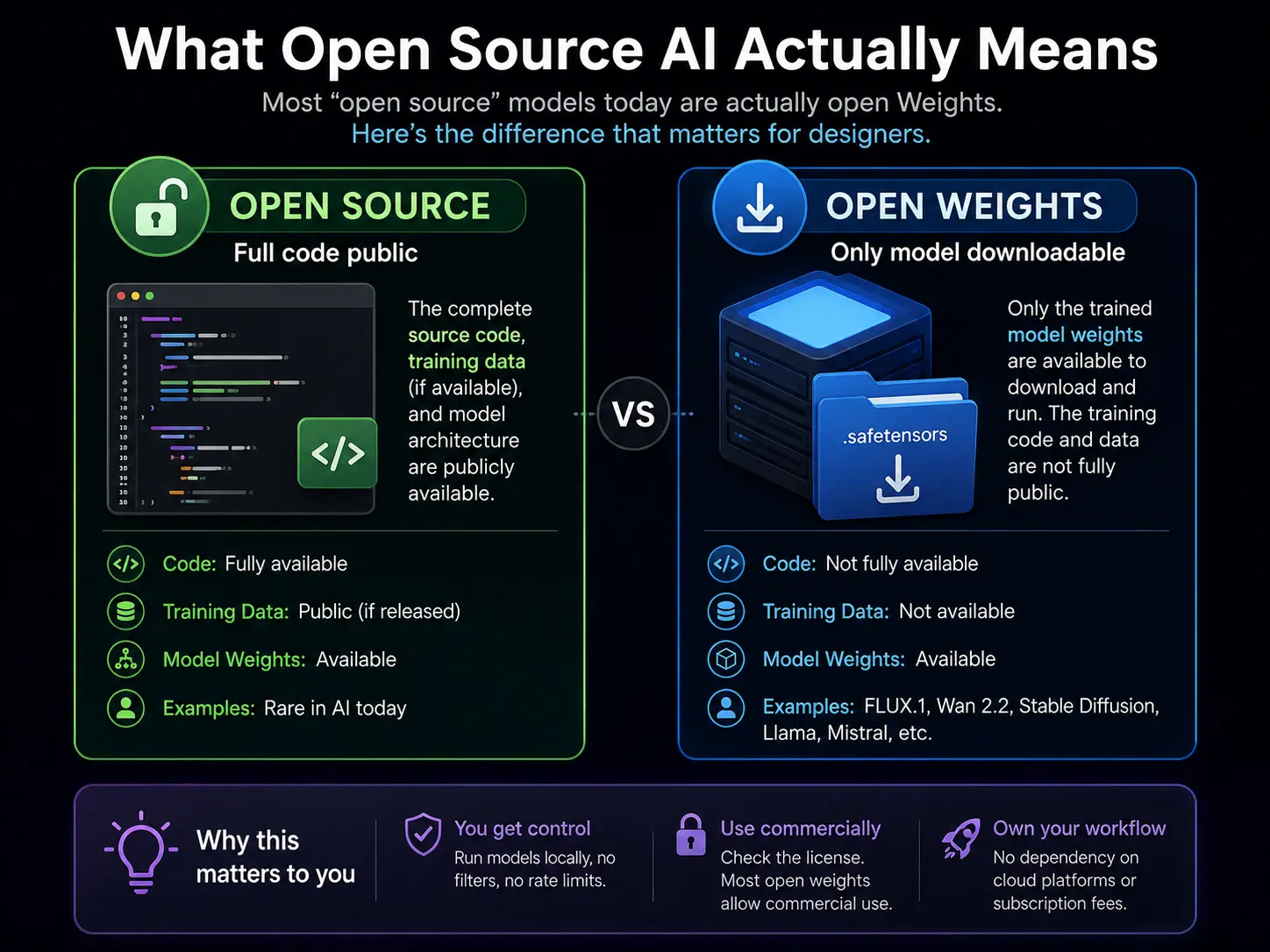
Technically, “open source” means the model’s code, training data, and weights are all publicly available. By that strict definition, very few so-called “open source” AI models fully qualify.
What most people actually mean is open weights — the trained model files are freely downloadable and runnable on your own machine, even if the full training pipeline isn’t public. FLUX.1, Wan 2.2, Stable Diffusion, and HunyuanImage all fall in this category.
For a designer, this distinction barely matters in practice. What matters is: can you download it, run it locally on your own hardware, and use it for commercial client work without paying per generation?
With most of these models — yes. But always check the license first. FLUX.1 Schnell uses Apache 2.0, which allows free commercial use. Some others have restrictions. Check the model card on HuggingFace before using any output in paid client work.
The Real Decision: Time vs. Control (Not Free vs. Paid)
Most designers think this debate is about saving money. It isn’t.
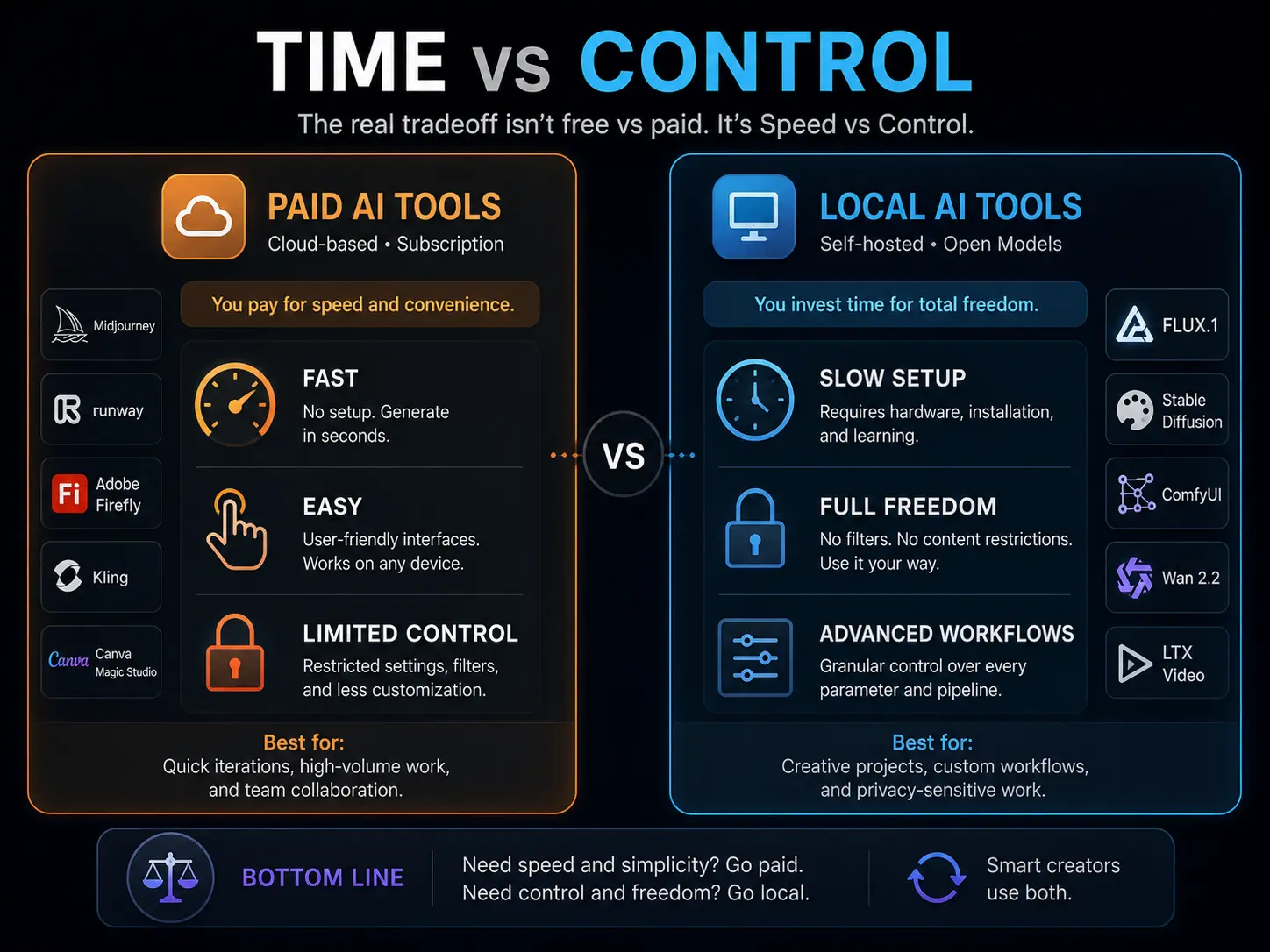
The real tradeoff is Time vs. Control.
Paid tools give you speed. Adobe Firefly, Canva Magic Studio, and Midjourney run on cloud servers. No setup, no GPU, no installation headaches. You type a prompt and get a result in seconds. For high-volume client work — 50 social banners by Thursday — this speed is genuinely valuable.
Local AI workflows give you control. When you run FLUX through Forge or route it through a self-hosted ComfyUI pipeline, you control camera angle, lighting direction, sampling steps, motion strength, and depth of field. Things paid tools either don’t offer or lock behind expensive enterprise tiers.
Here are the five factors that should drive your decision:
Content restrictions: Paid cloud tools have aggressive safety filters. Dark themes, intense expressions, dramatic lighting — these get blocked regularly. Run a generative AI model locally, and there are zero filters. Full creative freedom.
Watermarks: Lower-tier paid subscriptions add watermarks. That’s a non-starter for client work. Self-hosted AI tools have none.
Client work vs. personal projects: Tight deadline with a paying client? Paid tools save time. Personal projects, experiments, and building new skills? Local diffusion workflows are better because you’re learning, not just executing.
Data privacy: When you upload a client’s unreleased product photos to a cloud AI platform, you’re trusting their data policies — and many explicitly state they can use your inputs for model training. For NDA-protected client assets, running everything locally is the only safe option.
Budget vs. hardware: Offline AI image generation looks free on paper. But it requires a capable GPU. More on this in the beginner section.
The simple rule: Speed and collaboration needed → go paid. Deep customisation, zero restrictions, complete privacy → go local. Most experienced creators use both, and switching between them based on the project is a real professional skill.
Open Source vs. Paid AI Tools: Quick Comparison
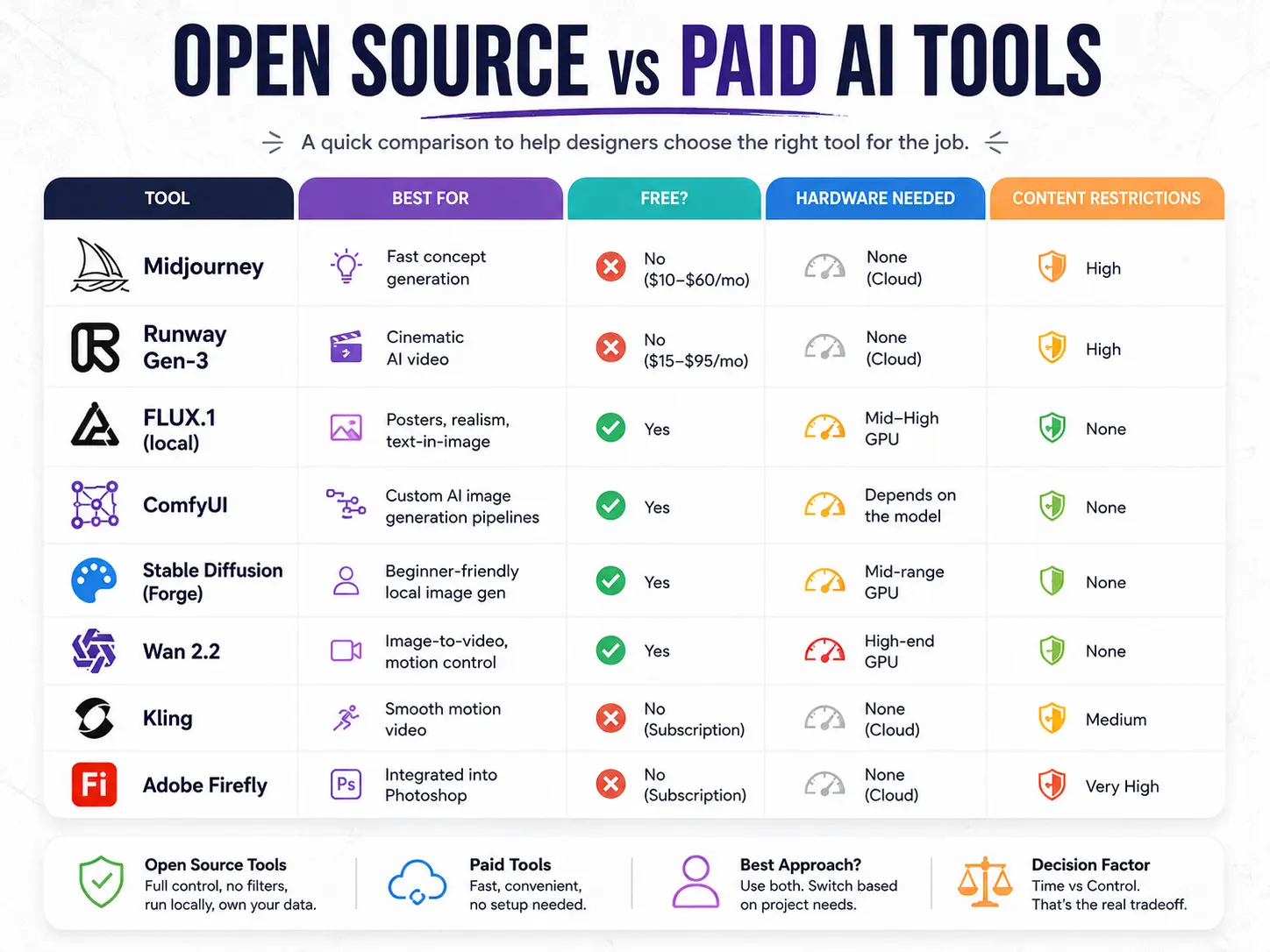
| Tool | Best For | Free? | Hardware Needed | Content Restrictions |
|---|---|---|---|---|
| FLUX.1 (local) | Posters, realism, text-in-image | Yes | Mid-high GPU | None |
| Wan 2.2 | Image-to-video, motion control | Yes | High-end GPU | None |
| ComfyUI | Custom AI image generation pipelines | Yes | Depends on the model | None |
| Stable Diffusion (Forge) | Beginner-friendly local image gen | Yes | Mid-range GPU | None |
| Midjourney | Fast concept generation | No ($10–$60/mo) | None (cloud) | High |
| Runway Gen-3 | Cinematic AI video | No ($15–$95/mo) | None (cloud) | High |
| Adobe Firefly | Integrated into Photoshop | No (subscription) | None (cloud) | Very High |
| Kling | Smooth motion video | No | None (cloud) | Medium |
When Runway Failed, and a Local Setup Saved the Project
This is a real production story — not a benchmark, not a YouTube demo.
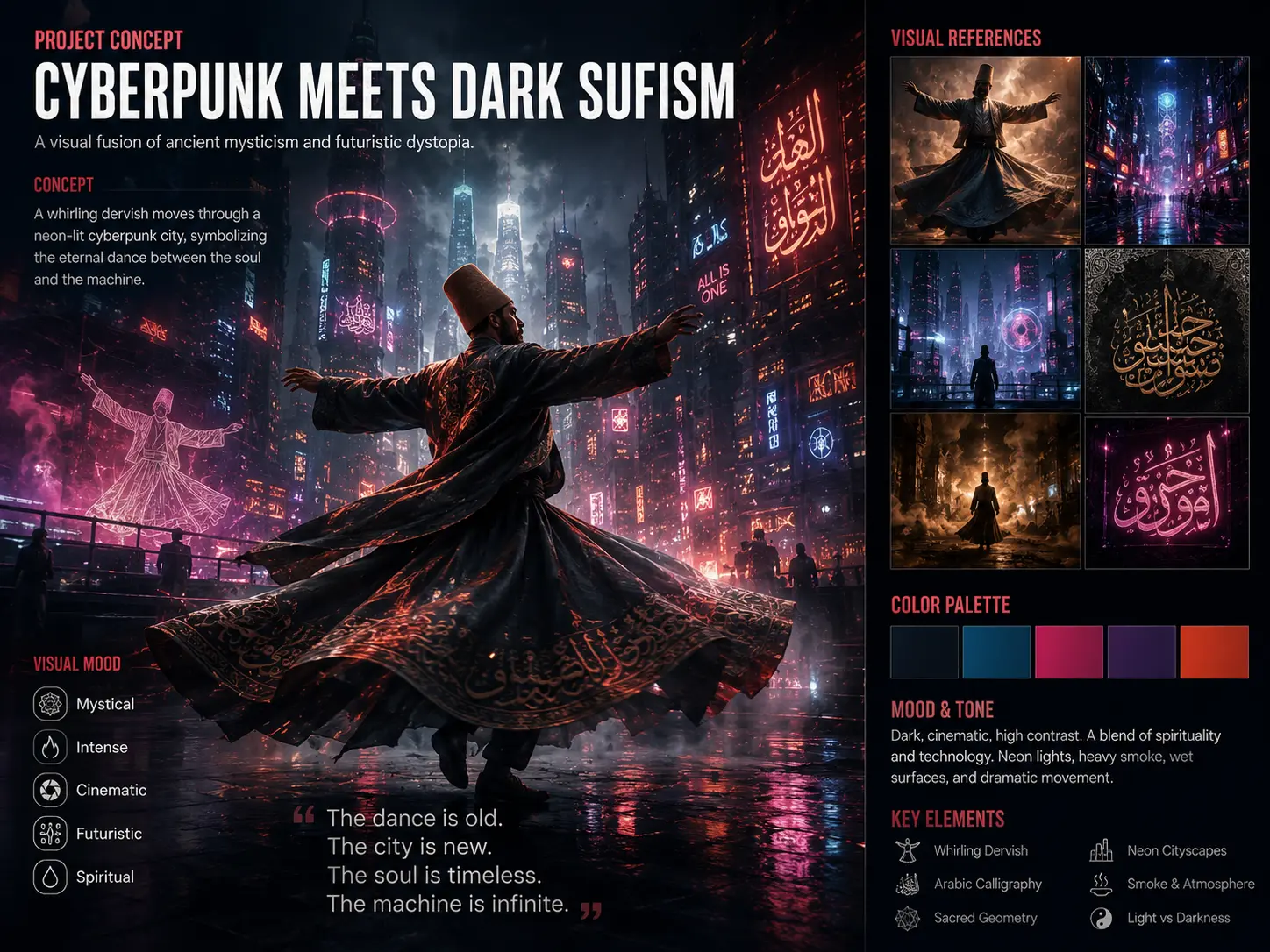
The Project: A short cinematic promo with a very specific creative brief: “Cyberpunk meets Dark Sufism.” A whirling dervish — a mystic dancer — moving through neon lights and smoke, with a hyper-fast camera orbiting around him in a sweeping circular motion. Final output needed at 1080p, cut into a 4-second hero clip.
Phase 1: Paid Tools — What Went Wrong
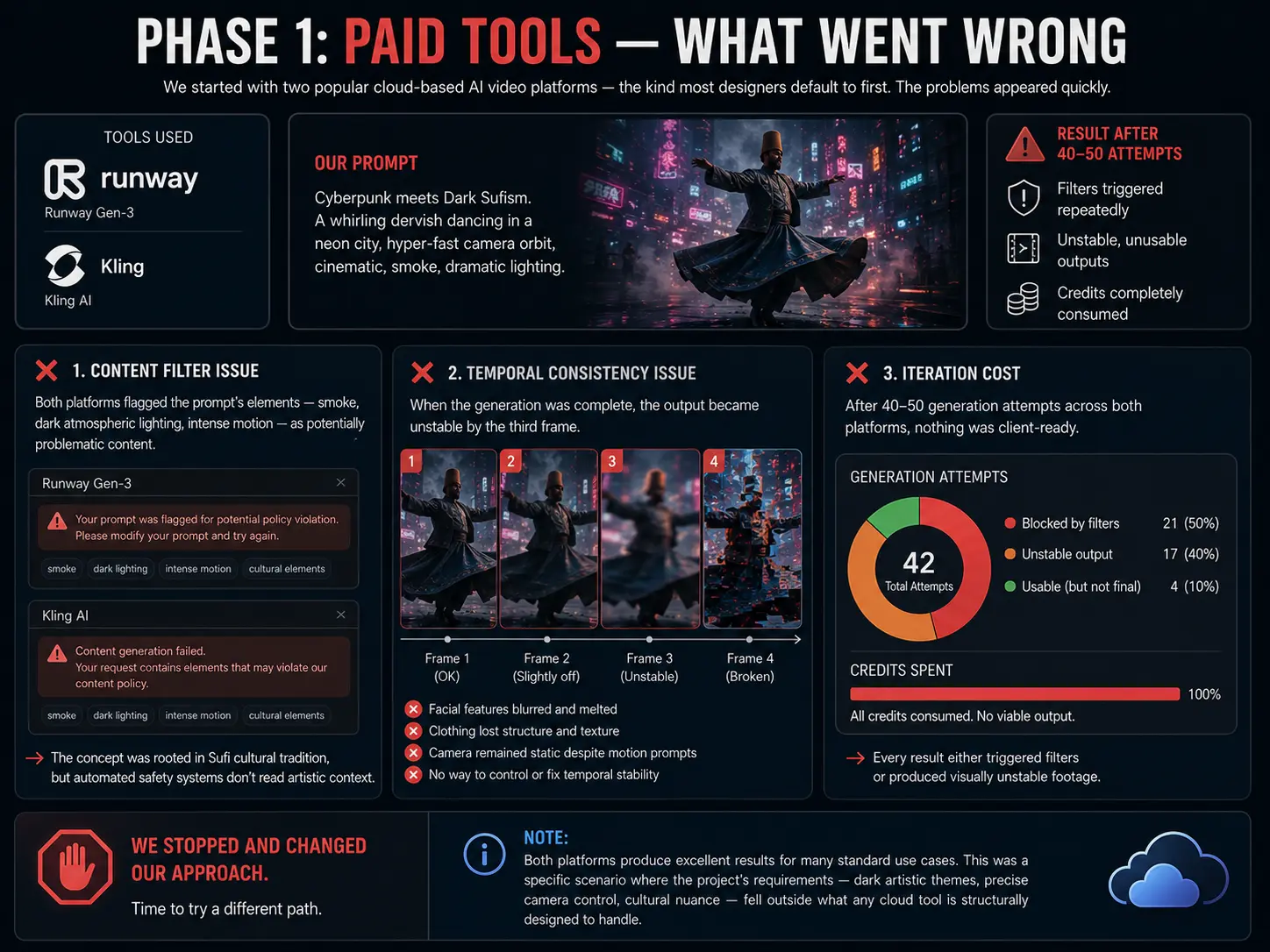
We started with two popular cloud-based AI video platforms — the kind most designers default to first. The problems appeared quickly.
The content filter issue: Both platforms flagged the prompt’s elements — smoke, dark atmospheric lighting, intense motion — as potentially problematic content. The concept was rooted in Sufi cultural tradition, but automated safety systems don’t read artistic context. Requests were blocked or significantly degraded before generation even completed. This isn’t a criticism of any specific platform — it’s a structural limitation of cloud-based AI tools that must apply broad filters across millions of users with very different intentions.
The temporal consistency issue: When the generation was complete, the output became unstable by the third frame. The character’s facial features blurred, clothing lost its texture and structure, and the camera remained static regardless of the motion prompts used. Cloud video tools don’t expose the underlying parameters that control temporal stability — you get what the model decides to give you, with no way to intervene.
The iteration cost: After 40–50 generation attempts across both platforms, nothing was client-ready. Every result either triggered filters or produced visually unstable footage. The credits were gone.
We stopped and changed our approach.
Note: Both platforms produce excellent results for many standard use cases. This was a specific scenario where the project’s requirements — dark artistic themes, precise camera control, cultural nuance — fell outside what any cloud tool is structurally designed to handle.
Phase 2: Local Open Source Setup — What Actually Worked
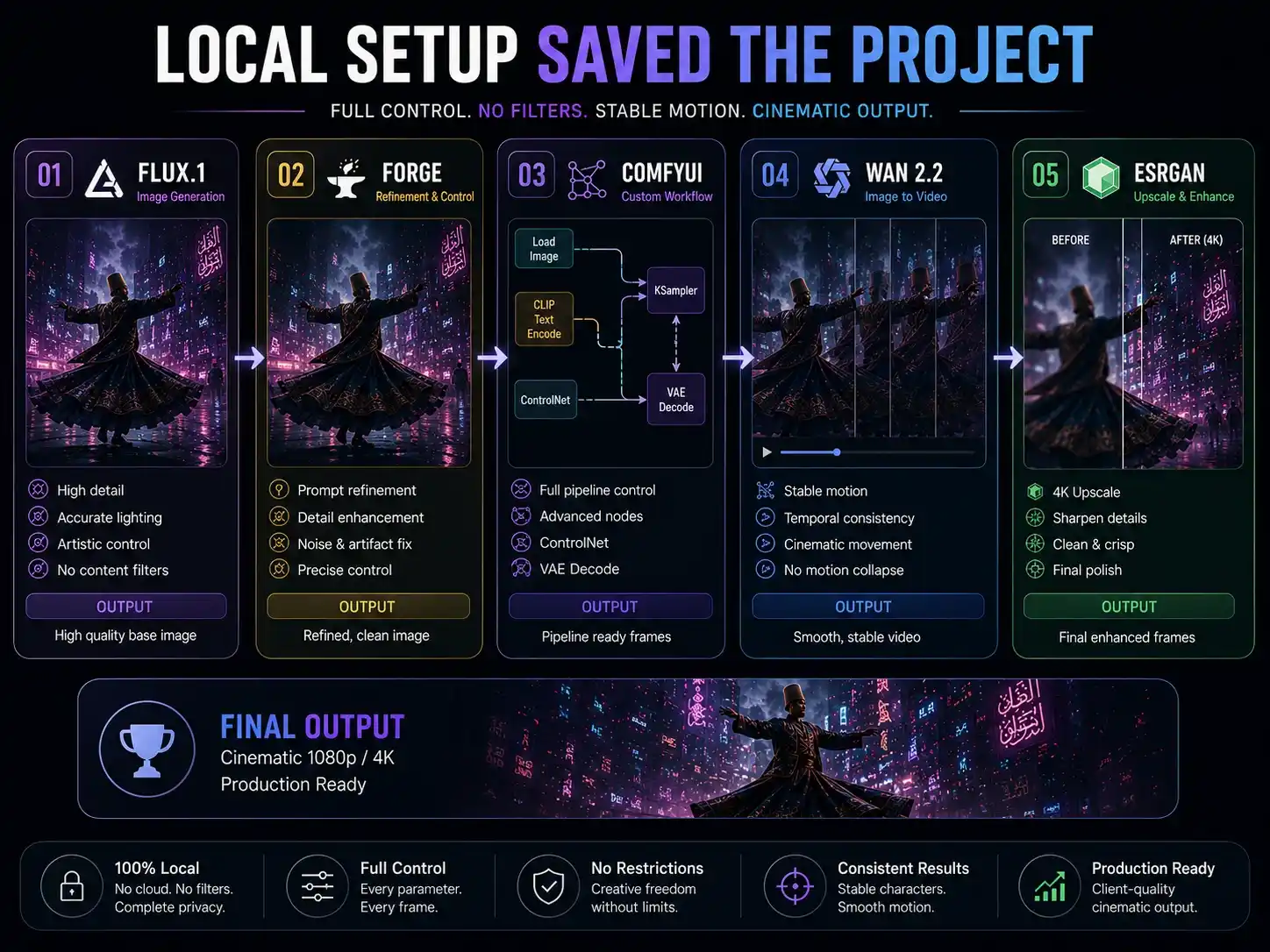
Hardware used: RTX 4070 Ti (12GB VRAM), 32GB RAM, NVMe SSD
Tools: FLUX.1 Dev (inside SD WebUI Forge) for the base image, then Wan 2.2 Image-to-Video model running inside ComfyUI for the motion output.
The AI image generation pipeline:
FLUX.1 Dev → 1024×1024 base image (28 steps, CFG 3.5) → ComfyUI → Wan 2.2 I2V → 4-second 720p clip
Generation specs for the final clip:
- Base image render time: ~45 seconds on RTX 4070 Ti
- Wan 2.2 video generation: ~12 minutes per 4-second clip at 720p
- Total iterations to reach final output: 15 variations
- Sampling steps: 50 (Wan 2.2 DPM++ scheduler)
- Motion Strength: 0.85 (manually adjusted per iteration)
- Flow Matching guidance: 3.5
- Final resolution: Upscaled to 1080p via Real-ESRGAN post-processing
- Total generation cost: $0
What the local setup made possible that paid tools couldn’t:
The Motion Strength parameter in Wan 2.2 is the key control that no cloud video tool exposes. By tuning it from 0.6 to 0.85 across iterations, we found the exact setting where the camera orbit was aggressive enough to look cinematic but not so high that the subject started distorting.
The Flow Matching guidance controlled how tightly the motion followed the base image’s composition. At 3.5, the dervish’s robes maintained their fabric folds and geometry throughout the entire circular camera sweep — no melting, no morphing, no temporal breakdowns.
The client approved the clip on the first review. No revisions.
That 4-second clip was architecturally impossible on any paid platform we tried. It required direct parameter-level access that only a self-hosted local diffusion workflow can give you.
The real lesson here isn’t that open source is always better. It’s that when a project requires exact motion control — frame-level timing, specific camera behavior, stable textures across frames — paid tools hand you a locked box. Local tools hand you the keys.
Best Use Cases for Local AI Image Generation in 2026
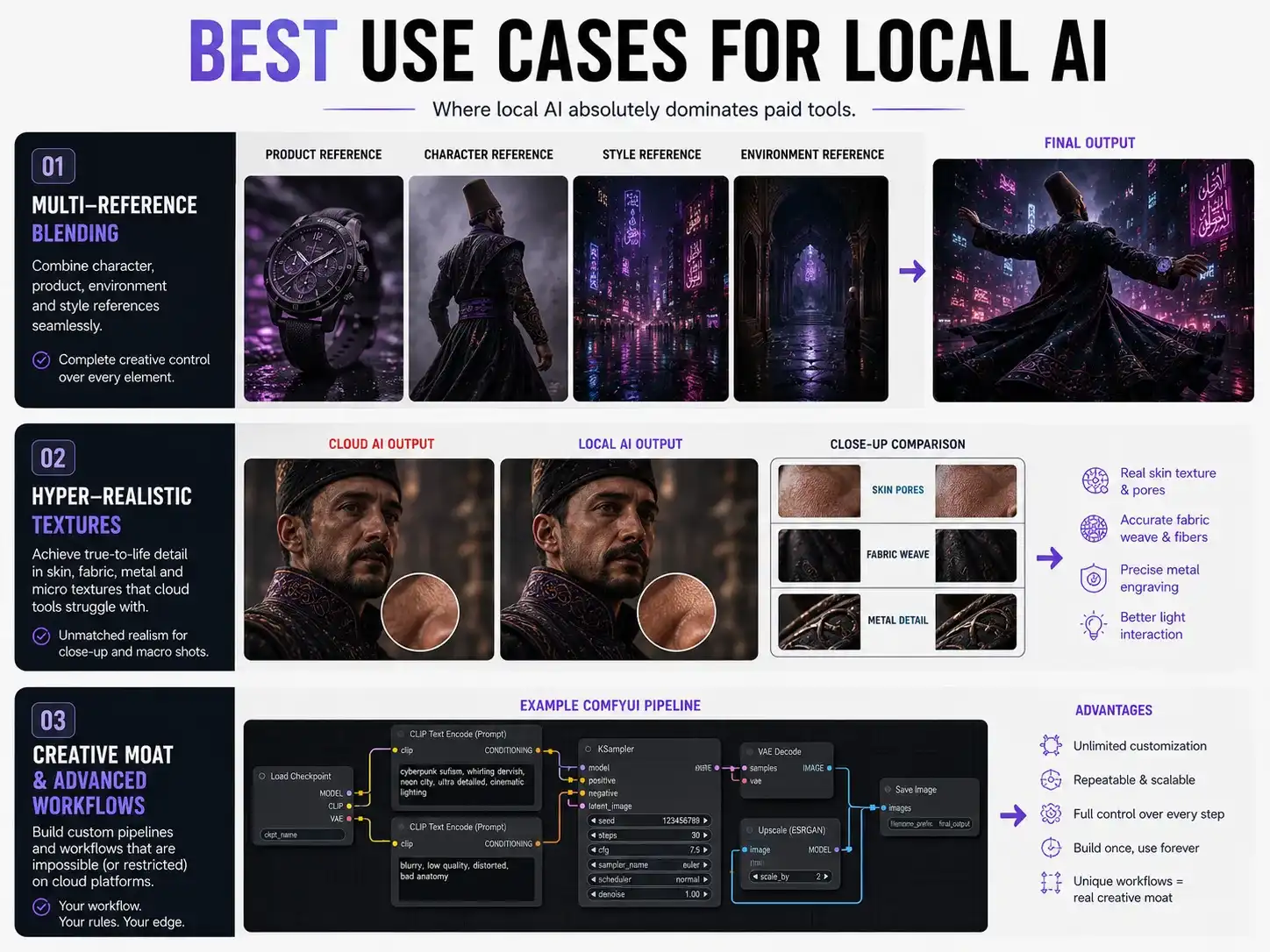
Here’s where open source genuinely leads — based on real output, not press releases.
1. Paid tools have hit the “corporate sanitisation wall”
Midjourney, Adobe Firefly, and Canva have made a calculated business decision to over-sanitize their generative AI tools for the broadest possible market. The result is what’s now instantly recognizable as the “AI look” — over-smoothed, slightly plastic, predictable. There’s a reason every Canva-generated marketing image feels like it came from the same assembly line.
If you want a visual signature that nobody can replicate with a $20 subscription and the same prompt, cloud-based tools are actively working against that goal.
2. Multi-reference blending for brand design
New FLUX.2 architecture includes built-in multi-reference support. Feed in a character design, a specific art style, and a product photo simultaneously — the model blends them into one coherent output without custom LoRA training or fine-tuning. This kind of deep cross-referencing for brand asset creation is not natively available in Midjourney.
3. Hyper-realistic textures for commercial work
Models like HunyuanImage 3.0 (Tencent) and Qwen Image Max (Alibaba) have genuinely eliminated the “waxy AI skin” problem that plagued earlier diffusion models. They render micro-textures, skin pores, fabric weaves, and surface materials at a quality level where paid platforms look noticeably artificial in direct comparison. For high-end product photography mockups and poster work, this matters.
4. Your pipeline becomes your creative moat
When you build a custom ComfyUI pipeline — your specific node arrangement, your model combination, your ControlNet setup — that workflow belongs to you. Nobody can reproduce your output by typing the same prompt into Midjourney.
With cloud tools, share your prompt, and anyone with the same subscription can clone your result. With a self-hosted AI image generation setup, your production process itself is the trade secret. That distinction is worth real money in 2026.
Where Paid Tools Still Win
Video generation quality for general shots: Kling and Seedance produce smoother, more cinematic results than open source video models for broad, unspecific motion. Wan 2.2 is powerful for precise, controlled sequences like our case study — but for general motion quality at scale, paid video tools still lead. [See our comparison: Best Open Source AI Video Models in 2026]
Zero hardware barrier: No capable GPU means cloud-based paid tools are your only real option until you upgrade.
Speed for bulk deliverables: 50 social media banners in an afternoon — a paid tool with a clean UI will always outpace a local offline AI setup for raw volume.
The smart move isn’t permanently picking one side. It’s knowing which tool to reach for and when. Most experienced creators run parallel setups. [See: ComfyUI vs Forge — Which One Should Designers Use?]
How to Start with Local AI as a Designer: No-Nonsense Guide
If you’ve only used Canva and Photoshop, here’s exactly what to do — no sugarcoating.
The Hardware Reality
Forget running this on a laptop without a dedicated graphics card. Minimum entry point for local diffusion workflows:
- GPU: NVIDIA RTX 3060 (12GB VRAM) or RTX 4060 (8GB VRAM) — VRAM is the bottleneck, not regular RAM
- Recommended: RTX 4060 Ti (16GB VRAM) or RTX 4070/4080 for professional work
- System RAM: 16GB minimum, 32GB is safer
- Storage: 1TB NVMe SSD — AI model checkpoints are 10–30GB each and fill up fast
Why NVIDIA? CUDA compatibility. AMD and Intel cards can technically run these tools but troubleshooting compatibility issues drains time beginners can’t afford to lose. [Full breakdown: Best GPU for AI Image Generation in 2026]
Mac users with M2/M3 Pro or Max chips and 16GB+ unified memory can run most generative AI tools — but generation speed will be slower than a comparable NVIDIA setup.
Don’t Start with ComfyUI
The most common beginner mistake. Someone watches a tutorial featuring a 500-node ComfyUI workflow, opens the app, and the screen looks like a circuit board. Something throws a red error. They quit.
Start with SD WebUI Forge + FLUX.1 Schnell (quantised).
Forge has a familiar interface — sliders, text fields, buttons. It manages VRAM efficiently, so FLUX runs on mid-range cards without crashing. FLUX is the right starting model for designers because it handles text rendering inside images accurately (critical for poster work) and generates correct human proportions — the two areas where most AI image models fall apart first. [Full walkthrough: FLUX.1 Beginner Guide for Designers]
The 4-Step Learning Path
Step 1 — Install Pinokio first
Pinokio. computer is a free open source app browser that installs Forge, ComfyUI, Wan 2.2, and other local AI tools with one click — no terminal, no Python commands, no technical knowledge. This is the entry point for non-technical designers.
Step 2 — Two weeks with FLUX in Forge
Don’t rush toward video or animation. Spend two full weeks on image generation — different styles, aspect ratios, lighting, and compositions. Understand how your prompt affects the output. Get comfortable with CFG scale, sampling steps, and seed locking.
Step 3 — Learn ControlNet
ControlNet is the single most powerful tool in the self-hosted AI world for designers. Draw a rough composition sketch — even a basic layout — and the model renders a fully detailed image that follows your exact structure. Not available at this level of control in any paid cloud platform. [Full guide: How ControlNet Works and Why Designers Need It]
Step 4 — Graduate to ComfyUI
Once you understand how FLUX works, what a sampler does, and how ControlNet processes input — open ComfyUI. The node interface will make logical sense by then because you’ve already used every concept in a simpler form inside Forge. [Setup guide: How to Install ComfyUI in 2026]
The mistake to avoid: Downloading a complex pre-built workflow from GitHub before understanding the basics. This “Frankenstein workflow trap” is where 90% of designers quit.
FAQ: Open Source AI for Designers
Is open source AI free to use for commercial projects?
Most popular models are — but verify the license. FLUX.1 Schnell (Apache 2.0) and most Stable Diffusion variants explicitly allow free commercial use. Always check the model card on HuggingFace before delivering AI-generated assets to a client.
Can FLUX.1 run on 8GB VRAM?
Yes. FLUX.1 Schnell runs on 8GB VRAM using GGUF quantised versions through Forge or ComfyUI. Output quality is slightly lower than the full FP16 model but completely usable for professional client work.
Is ComfyUI hard for beginners?
Honestly, yes — if you start there directly. Start with SD WebUI Forge, understand the fundamentals, then transition to ComfyUI. In that sequence, it becomes manageable. Jumping straight to ComfyUI is where most people give up.
Is Midjourney better than local open-source AI?
For pure speed and quick concept iterations — yes. For motion control, customization, privacy, and anything the safety filters block — local open source wins. Most professional creators run both and switch based on the project.
What’s the best GPU for local AI image generation?
For beginners: RTX 4060 (8GB VRAM). For professional workflow: RTX 4060 Ti (16GB VRAM) or RTX 4070. More VRAM means larger models, higher resolution outputs, and fewer out-of-memory crashes.
What’s the difference between FLUX and Stable Diffusion?
Both are open-weight image generation models you can run locally. FLUX.1 (2024–2025) is newer and significantly better at text rendering inside images, photorealism, and accurate human anatomy. Stable Diffusion has a much larger community, more extensions, and more tutorials available. For designers starting now, FLUX gives better image quality out of the box, while Stable Diffusion’s ecosystem gives more workflow flexibility long-term.
The Verdict
Not just relevant. In the right hands, local open source AI is the better long-term bet for designers who want to stay irreplaceable in a market that’s becoming commoditized by cloud AI tools.
Here’s the part no paid tool company will tell you: Midjourney and Canva are making designers replaceable. When any client with a Rs. 2,000 monthly subscription can generate the same visual style you’re producing, your fee becomes hard to justify. The tools that gave you an edge in 2023 are now available to everyone.
Self-hosted AI image generation pipelines — specifically local setups built in Forge and ComfyUI with custom workflows — create something cloud tools fundamentally cannot: a production process that nobody can clone by copying your prompt.
Your node pipeline, your model combinations, your ControlNet sketches — these are yours alone. That’s where market value lives in 2026.
The designers who thrive over the next three years won’t be the ones who got better at prompting Midjourney. They’ll be the ones who understood local diffusion workflows at a deeper level and built visual production pipelines their clients couldn’t replicate anywhere else.
Open source AI for designers is not the budget option. It’s the professional option — if you’re willing to invest the time to learn it properly.
Paid tools are faster on day one. Local AI is stronger every day after that.
Setting up your first local AI workflow and hitting a wall? Drop your question in the comments.