
Description
A food photo can stop the scroll. A clear offer gives people a reason to order.
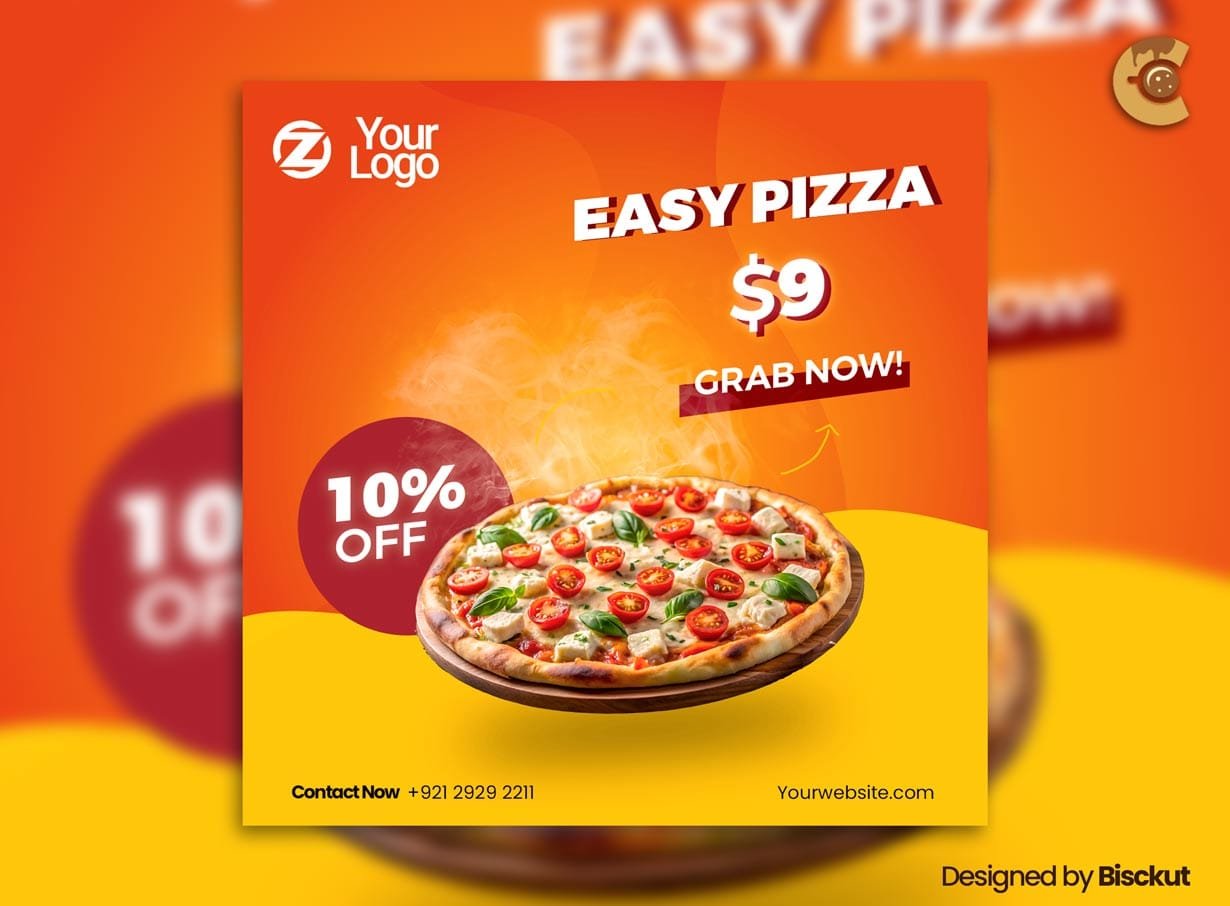
This Free Restaurant Promotional Flyer PSD gives restaurants, cafés, takeaways, and fast-food businesses a bold layout for advertising food deals, discounts, combo offers, and limited promotions online.
Created in high-resolution RGB colour mode, the template is designed for digital marketing across social media and other online channels. The PSD is fully editable, allowing you to update the text, colours, prices, branding, and promotional details in Adobe Photoshop.
The preview images are not included, so you can replace them with your own food photography or suitable licensed images.
Build the Offer Before Editing the Flyer
Don’t open Photoshop first.
Write the complete promotion in one sentence.
For example:
“Get one large pizza, garlic bread, and two drinks for $24.99, available for collection until Sunday.”
Now you know what the design needs to communicate.
Without a clear offer, it’s easy to create a flyer that looks delicious but leaves customers wondering what they actually get.
Key Features
- Fully editable PSD template
- High-resolution artwork
- RGB colour mode
- Customisable text and colours
- Editable prices and branding
- Modern food promotion layout
- Suitable for digital marketing
- Ideal for social media campaigns
- Preview images not included
Best For
This template can be adapted for:
- Restaurant promotions
- Pizza deals
- Burger combos
- Café offers
- Takeaway campaigns
- Fast-food promotions
- Meal discounts
- Limited-time specials
- Delivery campaigns
- Social media food advertising
Designer Tip
Don’t make the discount larger than the food.
People are buying the meal, not the percentage symbol.
The main food image should help customers understand what is being offered. The price or discount can support the decision, but it shouldn’t completely overpower the product.
A strong food promotion usually needs three things to work together:
- An appetising image
- A clear offer
- An easy ordering method
If one of these is missing, the campaign becomes weaker.
Explain What’s Included
Combo deals often look simple until someone tries to order.
If the promotion includes multiple items, make the contents clear.
For example:
- Number of burgers
- Pizza size
- Number of drinks
- Side dish
- Dessert
- Choice of flavours or toppings
Avoid using a photograph that shows more food than the customer actually receives.
The image and written offer should tell the same story.
Make the Price Easy to Understand
If the flyer includes a price, explain what it applies to.
Is it:
- The full combo price?
- A starting price?
- A per-person price?
- A discount on selected items?
- Available only above a minimum order?
Small conditions can change how attractive an offer really is.
Keep essential pricing information close to the main promotion instead of hiding it in tiny text.
Use Real Food Photography When Possible
The preview images are not included.
For the strongest and most accurate promotion, use photographs of the actual food being sold whenever possible.
Customers may expect the product to resemble the advertisement.
If you use stock photography from a source such as Pixabay, choose an image that closely represents the real menu item and avoid creating unrealistic expectations about portion size, ingredients, or presentation.
A less dramatic but accurate image can be more useful than a beautiful photo of a completely different meal.
Tell Customers How to Order
“Order Now” is only useful when the next step is obvious.
Depending on the restaurant, include:
- Phone number
- Website
- Ordering app
- QR code
- Direct message option
- Collection instructions
If the offer is available only through one ordering method, make that clear.
For example, an app-only discount shouldn’t look like it can be claimed by phone or in-store.
Delivery, Collection, or Dine-In?
The same promotion may not apply everywhere.
Clearly state whether the offer is available for:
- Delivery
- Collection
- Dine-in
- Drive-through
- Online orders only
This information can prevent confusion and reduce unnecessary questions.
It is especially important when a discount is tied to a specific ordering channel.
Add Honest Urgency
Food offers often work well with a genuine time limit.
Use accurate information such as:
- Available this weekend
- Valid until a specific date
- Lunch hours only
- Friday special
- While stocks last
- Selected locations only
Don’t use “last chance” or “today only” unless that is actually true.
Real urgency is enough.
Design for a Phone Screen
This template uses RGB colour mode and is intended primarily for digital promotion.
Before publishing, view the final flyer at phone size.
Can you still read:
- The food item
- The main offer
- The price
- The expiry date
- The ordering method
If the promotion only makes sense after zooming in, simplify the layout.
Social media users usually see the design much smaller than it appears inside Photoshop.
Create a Campaign, Not Just One Post
The main promotional flyer can introduce the offer, but supporting content can answer other questions.
For example:
- Main post: offer and hero image
- Story: countdown or reminder
- Second post: what’s included
- Final story: last day of the promotion
Keep the same food image, colours, and offer details consistent across the campaign.
Changing the price or conditions between posts can create confusion.
Before Publishing
Check:
- Correct food items
- Accurate price
- Portion or size details
- Offer dates
- Ordering method
- Delivery or collection conditions
- Restaurant contact details
- Location restrictions
Also compare the final design with the actual offer.
The flyer should make the promotion look appealing without promising something the customer won’t receive.
Technical Details
- File Format: PSD
- Colour Mode: RGB
- Quality: High resolution
- Editable Elements: Text, colours, prices, and branding
- Software Required: Adobe Photoshop
- Preview Images: Not included
- Best For: Digital restaurant promotions and social media campaigns
This restaurant promotional flyer works best when the deal is easy to understand at a glance. Define the complete offer first, use an accurate food image, explain what customers receive, and make the ordering process obvious.

Reviews
There are no reviews yet.