
Description
A corporate flyer shouldn’t try to explain the entire company.
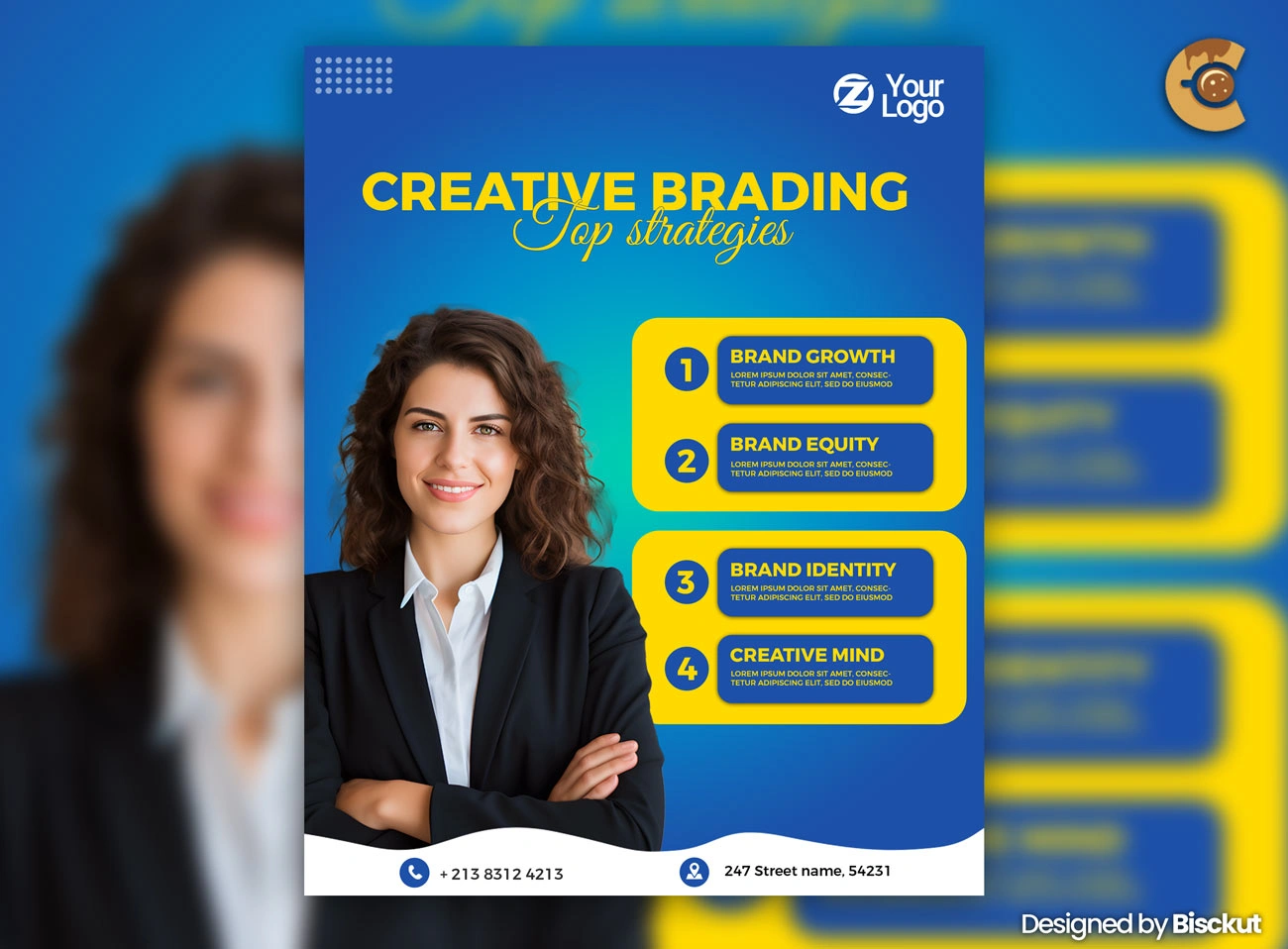
This Free Modern Corporate Flyer Template PSD gives businesses, startups, agencies, and professionals a clean layout for promoting one clear message. Use it to introduce a service, announce an event, present an offer, or support a focused marketing campaign.
The Photoshop file is fully editable, with organised layers that make it easy to replace the text, colours, images, and branding elements. Created in RGB colour mode, the template is naturally suited to digital promotions, online advertisements, email campaigns, and website graphics.
Give the Flyer One Job
Before editing the template, complete this sentence:
“After seeing this flyer, I want the reader to…”
Book a consultation?
Register for an event?
Visit a website?
Request a quote?
Learn about a new service?
Choose one main action.
If you can’t finish that sentence clearly, the flyer probably has too many goals.
Key Features
- Fully editable PSD template
- RGB colour mode
- Modern corporate layout
- Organised Photoshop layers
- Customisable text and colours
- Replaceable images
- Suitable for business promotions
- Easy to adapt to different brand identities
- Free for commercial use
Best For
This template can be adapted for:
- Corporate promotions
- Service advertisements
- Startup campaigns
- Agency marketing
- Business events
- Professional invitations
- Product announcements
- Networking promotions
- Consultation offers
- Digital advertising
Designer Tip
Write the message before styling the flyer.
Many people customise the colours and images first, then try to fit the content into whatever space remains.
Reverse that process.
Start with:
- One headline
- One short explanation
- Three important points at most
- One call to action
- Essential contact details
Once the message is clear, adjust the design around it.
A corporate flyer becomes more professional when the reader can understand it quickly—not when it contains more information.
Don’t List Every Service
A business may offer ten services.
The flyer doesn’t need all ten.
If the campaign promotes one specific service, focus on that service and explain its strongest benefit. If the goal is to introduce the company more broadly, group related services into a few clear categories.
Long service lists create visual clutter and force the text to become smaller.
Move detailed information to the website, brochure, proposal, or landing page.
The flyer should create interest, not replace every other marketing document.
Lead With the Customer’s Need
Company-focused headlines often sound formal but say very little.
Phrases such as “Professional Business Solutions” can fit almost any company.
A stronger headline usually connects the service to a specific need, problem, or result.
Ask:
- What problem does the business solve?
- Who is the service for?
- What makes this offer relevant now?
Use the answer to make the headline more specific.
The logo tells people who you are. The headline should tell them why they should care.
Keep the Brand Consistent
When customising the template, use the actual brand system whenever possible.
Apply the correct:
- Logo version
- Brand colours
- Typography
- Image style
- Tone of voice
Avoid adding extra colours just because the template includes them.
A flyer should look like it belongs to the same company as the website, social media pages, presentation, and other marketing materials.
Consistency builds recognition.
Choose Business Images With a Purpose
Replace generic images with visuals that support the message.
If the flyer promotes a service, show the service, result, environment, or relevant audience when possible.
Avoid choosing an image simply because people are smiling in an office.
The photo should help explain the offer or strengthen the brand positioning.
A useful image adds context. A decorative stock photo only fills space.
Make the Call to Action Easy to Complete
Once the reader understands the offer, tell them exactly what to do next.
Depending on the campaign, this could be:
- Visit the website
- Scan a QR code
- Call for a consultation
- Request a quote
- Register for the event
- Book an appointment
Use one primary action.
Multiple competing calls to action can weaken the response because the reader has to decide what you want from them.
Digital and Print Use
The PSD is created in RGB colour mode, making it naturally suited to screen-based promotions such as social media, websites, online ads, and email campaigns.
If you plan to print the flyer, check the required document size, bleed, resolution, colour profile, and export format with your printing service before preparing the final artwork.
Don’t assume that an RGB file is automatically ready for commercial printing.
Technical Details
- File Format: PSD
- Colour Mode: RGB
- Design Style: Modern corporate
- Editable Elements: Text, colours, images, and branding
- Layer Structure: Organised and editable
- Software Required: Adobe Photoshop
- Best For: Business and professional marketing
- License: Free for commercial use
This modern corporate flyer works best when the message stays focused. Give the design one clear purpose, remove information that belongs somewhere else, and make the next step obvious for the reader.


Reviews
There are no reviews yet.