
Description
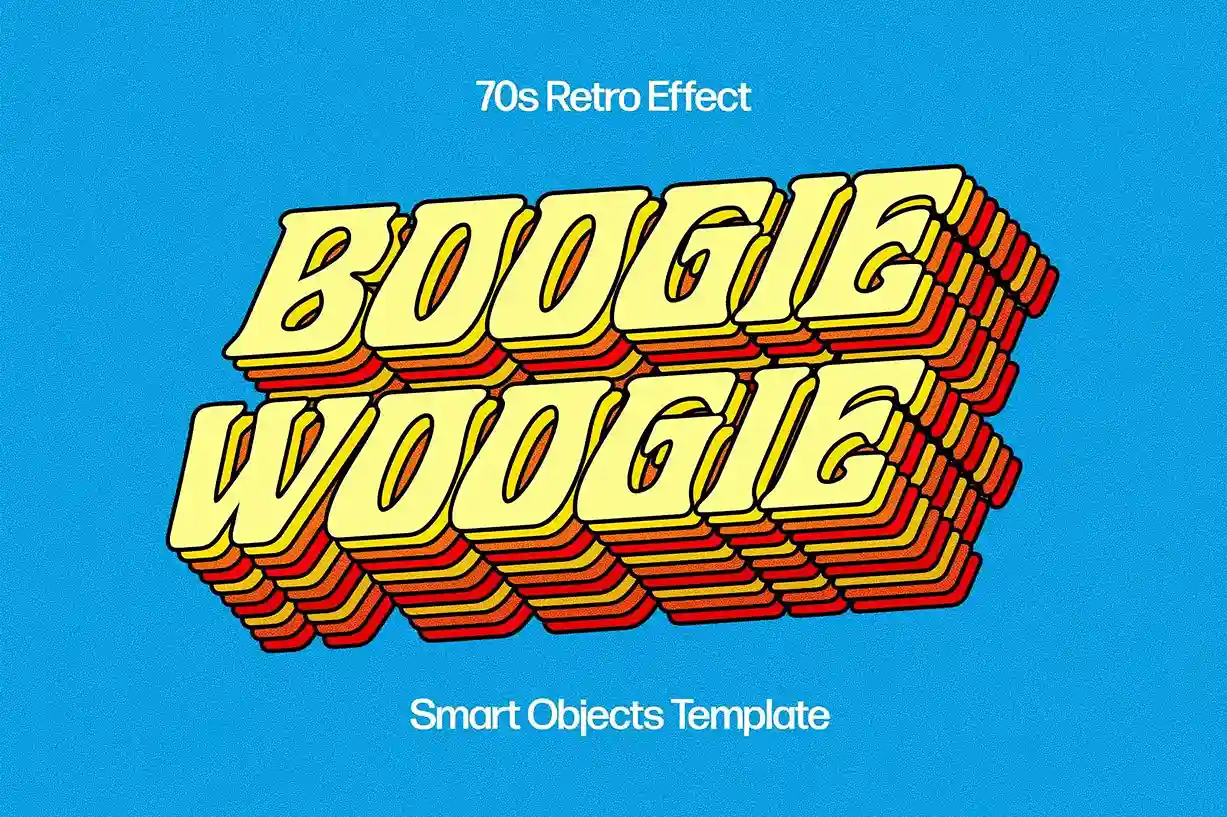
Bring bold vintage vibes to your typography with this Free Playful Retro Text Effect PSD. Inspired by classic retro advertising, colourful signage, and nostalgic pop culture, this fully editable Photoshop text effect transforms ordinary lettering into vibrant, eye-catching typography with just a few clicks.
Whether you’re creating posters, product packaging, social media graphics, logos, or merchandise, this retro-inspired PSD gives your text a fun personality while keeping the editing process fast and beginner-friendly.
Create Bold Retro Typography in Seconds
Retro typography never goes out of style.
Its bright colours, playful letterforms, and vintage-inspired details instantly add energy and character to a design. Instead of building layered effects manually, this PSD lets you generate the complete look automatically using Smart Objects.
Simply replace the placeholder text, save the Smart Object, and your typography is instantly transformed into a colourful retro composition.
Fully Editable Photoshop Template
The PSD file is carefully organised so every major element can be customised without affecting the overall effect.
You can edit:
- Text
- Fonts
- Colours
- Letter positioning
- Background
- Shadows
- Textures
- Decorative elements
- Overall composition
This flexibility makes the template suitable for everything from subtle vintage branding to bold promotional graphics.
Key Features
- Fully editable PSD template
- Smart Object text replacement
- High-resolution artwork
- Organised Photoshop layers
- Editable colours and textures
- Individual letter customisation
- Easy-to-use workflow
- Free for personal and commercial use
Perfect For
This text effect is ideal for:
- Poster design
- Event flyers
- Logo concepts
- Product packaging
- Branding projects
- Social media graphics
- T-shirt designs
- YouTube thumbnails
- Children’s products
- Creative typography artwork
Designer Tip
Retro typography often feels more authentic when it isn’t perfectly aligned.
Try making small adjustments to:
- Letter spacing
- Rotation
- Scale
- Position
Tiny imperfections create a more playful hand-crafted appearance while helping the design feel true to classic vintage print styles.
Quick Smart Object Workflow
Creating the effect is simple:
- Open the PSD file in Adobe Photoshop.
- Double-click the Smart Object layer.
- Replace the sample text with your own.
- Save the Smart Object.
- Return to the main document and the retro effect updates automatically.
This non-destructive workflow allows you to experiment with different fonts and wording without rebuilding the design.
Easy to Personalise
Although the retro effect is ready to use, you can easily customise it to match your project.
Adjust:
- Colour palette
- Background texture
- Shadow intensity
- Typography
- Decorative graphics
- Overall layout
Whether you’re aiming for a 70s-inspired look, colourful pop art, or playful vintage branding, the PSD adapts to a wide variety of creative styles.
Suitable for Print and Digital Projects
The high-resolution design makes this text effect suitable for:
- Posters
- Flyers
- Packaging
- Product labels
- Website graphics
- Presentation slides
- Social media campaigns
- Merchandise
- Print advertising
Its sharp quality ensures your typography looks crisp across both digital screens and professional printing.
Technical Details
- File Format: PSD
- Effect Type: Retro text effect
- Editing: Smart Object replacement
- Software: Adobe Photoshop
- Resolution: High resolution
- Editable Elements: Text, colours, textures, background, and layout
- License: Free for personal and commercial use
Whether you’re designing vintage-inspired branding, colourful posters, playful merchandise, or nostalgic social media graphics, this free Playful Retro Text Effect PSD helps you create bold typography with classic retro personality in just a few minutes.



Reviews
There are no reviews yet.