
Description
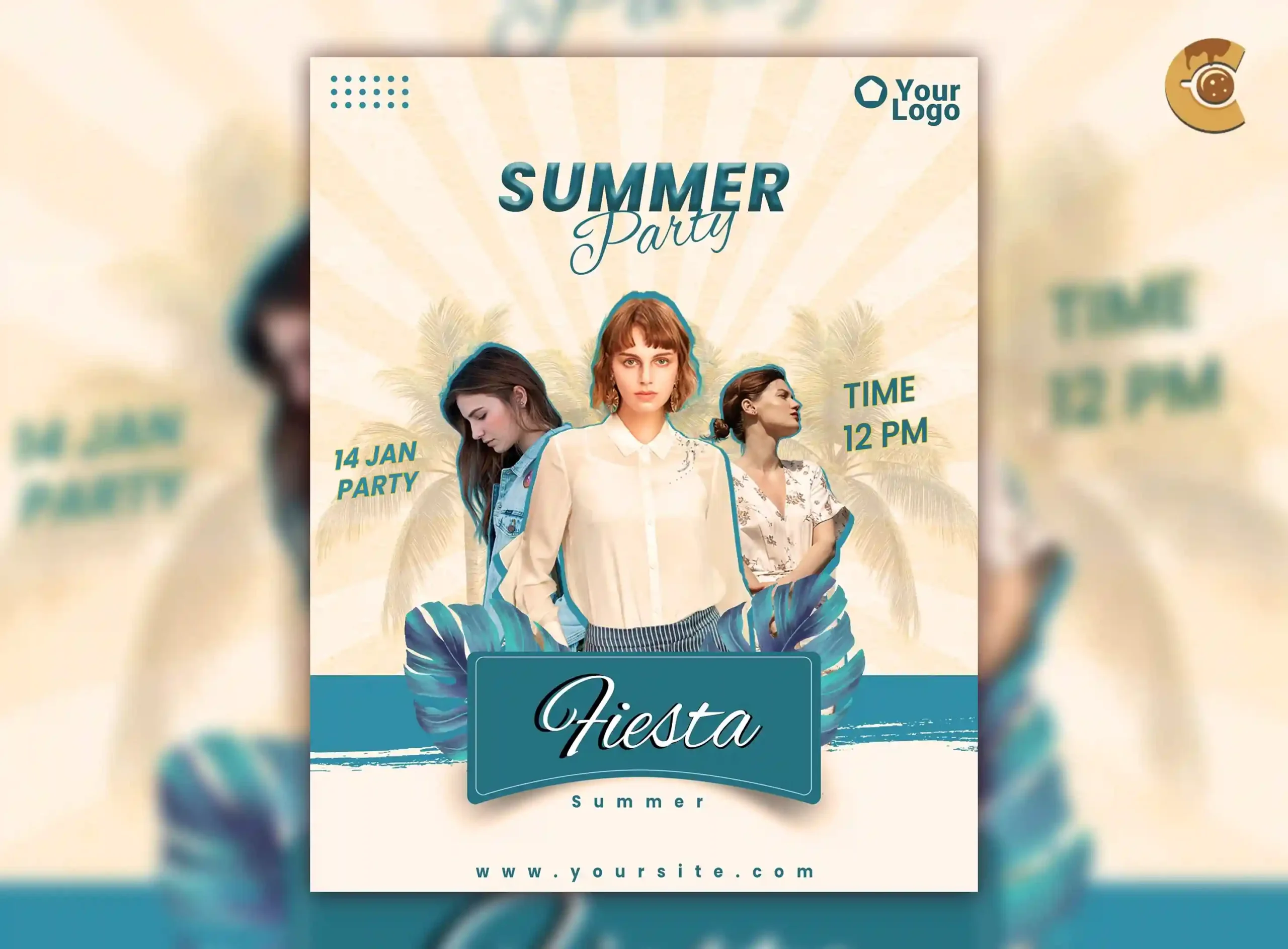
A beach party flyer has to sell the atmosphere and prepare people for an outdoor event.
This Free Summer Beach Party Flyer Template PSD gives event organisers, beach clubs, promoters, and DJs a vibrant layout for promoting summer festivals, pool parties, tropical events, and seaside celebrations.
The PSD is created in RGB colour mode at 300 DPI and can be customised in Adobe Photoshop. Edit the text, colours, event details, and design elements to match your own summer campaign.
The preview images are not included, giving you the freedom to add visuals that fit the actual location and event.
Outdoor Events Need Different Information
A nightclub flyer can usually stop at the date, time, venue, and lineup.
A beach or outdoor event may need more.
Guests could be wondering:
- Is the event directly on the beach?
- Is there parking nearby?
- What happens if it rains?
- Does the event continue after sunset?
- Are outside drinks allowed?
- Is there a dress code?
- Should guests bring anything?
You don’t need to place every answer on the main flyer, but the most important practical details should be easy to find somewhere in the campaign.
Key Features
- Fully editable PSD template
- RGB colour mode
- 300 DPI resolution
- Modern summer party design
- Customisable text and colours
- Organised Photoshop layers
- Suitable for beach and pool events
- Preview images not included
- Free for personal and commercial use
Best For
This template can be adapted for:
- Beach parties
- Poolside events
- Summer festivals
- Tropical parties
- DJ events
- Sunset sessions
- Beach club promotions
- Resort events
- Outdoor music events
- Seasonal celebrations
Designer Tip
Design the flyer around the time of day.
A daytime pool party, sunset beach session, and late-night coastal event should not all look the same.
Daytime Event
Use a brighter visual direction and make practical information about heat, access, or pool facilities clear when relevant.
Sunset Event
Let the timing become part of the experience. Warm lighting and a visible start time can help communicate the transition from day to evening.
Night Event
Make sure the flyer still feels connected to the beach location rather than becoming a generic nightclub design.
The event time should influence the colours, imagery, and atmosphere of the final artwork.
Make the Location Easy to Understand
Beach events are often harder to find than regular venues.
A venue name may not be enough.
Depending on the location, consider including:
- Beach or club name
- Entrance point
- Nearby landmark
- Parking information
- Map or QR code
- Transport details
If the location is difficult to explain on the flyer, link directly to a map or event page with clear directions.
Don’t make guests search for the correct entrance after they arrive.
Think About the Weather Plan
Outdoor events depend on conditions that indoor venues don’t.
If the event has a rain date, covered area, weather policy, or cancellation procedure, make that information available before the event.
The main flyer doesn’t need a paragraph about weather.
Instead, use the event page, caption, ticket page, or QR code to provide the latest information.
If plans change, update the digital promotion quickly and consistently across all channels.
Use the Flyer as the Start of the Campaign
One design shouldn’t carry every practical detail.
Use the main flyer to communicate:
- Event name
- Date
- Time
- Location
- Main performer or attraction
- Ticket or entry information
Then use supporting content for:
- Full lineup
- Weather updates
- Directions
- What to bring
- Venue rules
- Schedule changes
This keeps the flyer visually strong without leaving guests unprepared.
Choose Visuals That Match the Actual Experience
The preview images are not included and are credited to Pixabay.
When adding your own visuals, make sure they don’t create false expectations.
If the event is at a small beach bar, don’t use imagery that makes it look like a massive international festival. If there is no pool, avoid building the campaign around poolside visuals.
The promotional mood can be aspirational, but it should still represent the type of experience guests are actually buying.
Check the Event Time Carefully
Summer events often have several different times:
- Doors open
- Music starts
- Main DJ begins
- Sunset session starts
- Last entry
- Event ends
Don’t place one time on the flyer if guests need to know something more specific.
Use the most important time in the main design and provide the full schedule elsewhere when needed.
Digital and Print Use
The PSD uses RGB colour mode, making it naturally suited to digital promotions such as social media, event pages, online ads, and website graphics.
Although the file is created at 300 DPI, resolution alone doesn’t make an RGB file automatically ready for every professional print workflow.
If you plan to print the flyer, confirm the required colour profile, dimensions, bleed, and export format with your printing service.
Before Publishing
Check:
- Event date
- Start time
- Exact location
- Ticket information
- Weather policy
- Performer details
- Age restrictions, if applicable
- Venue rules
- Contact information
For outdoor events, also make sure someone is responsible for updating the campaign if conditions or event details change.
Technical Details
- File Format: PSD
- Colour Mode: RGB
- Resolution: 300 DPI
- Design Style: Modern summer and beach event
- Editable Elements: Text, colours, and design elements
- Layer Structure: Organised and editable
- Software Required: Adobe Photoshop
- Preview Images: Pixabay images, not included
- License: Free for personal and commercial use
This summer beach party flyer works best when the promotion feels exciting without ignoring the realities of an outdoor event. Build the design around the time of day, make the location easy to understand, and give guests a reliable place to find practical updates.

Reviews
There are no reviews yet.