
Description
A printed flyer has to work even when no one is there to explain it.
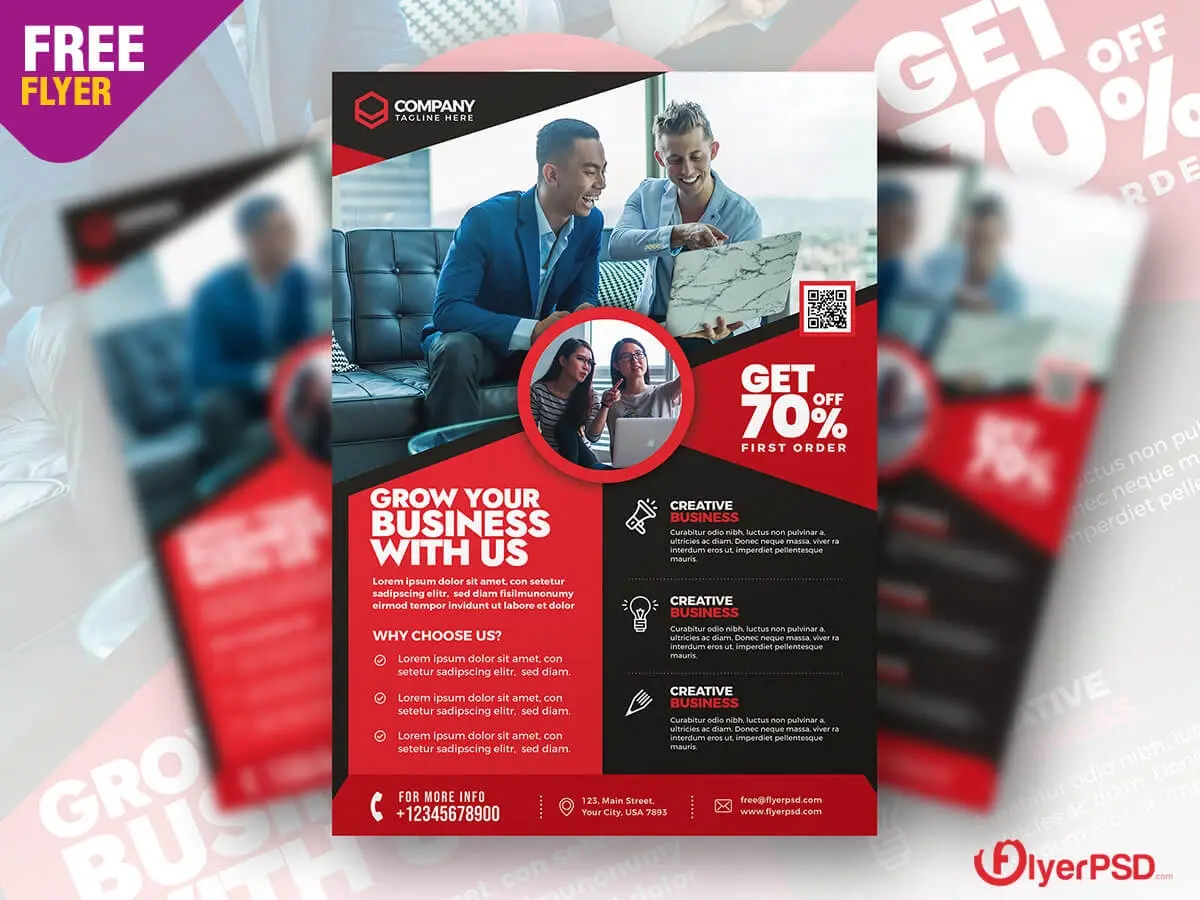
This Free Business Promotion Flyer PSD Template gives companies and professionals an A4 layout for promoting services, products, offers, and business campaigns. Created at 300 DPI in CMYK colour mode, the template is built with professional printing in mind.
The PSD can be edited in Adobe Photoshop, with compatibility starting from Photoshop CS2. Update the text, colours, images, and business details to adapt the flyer to your own campaign.
Design for the Moment Someone Picks It Up
Printed marketing has a different job from a social media post.
Online, people can click a link immediately.
A physical flyer may be picked up at a trade show, placed on a counter, handed out at an event, or taken home and read later.
That means the design needs to make sense on its own.
The reader should quickly understand who the business is, what is being offered, and how to take the next step.
Key Features
- Fully editable PSD template
- A4 document size
- 8.2 × 11.5 inch layout
- 300 DPI resolution
- CMYK colour mode
- Designed for professional printing
- Customisable text, colours, and images
- Compatible with Adobe Photoshop CS2 and above
- Suitable for different business sectors
Best For
This template can be adapted for:
- Business promotions
- Trade show handouts
- Local advertising
- Service marketing
- Product promotions
- Sales campaigns
- Company events
- In-store displays
- Reception areas
- Direct marketing materials
Designer Tip
Use the five-second pickup test.
Print a rough copy or view the flyer at approximately its real physical size.
Look at it for five seconds.
Then ask:
- What company is this?
- What are they offering?
- Why should I care?
- What should I do next?
If the flyer doesn’t answer at least the first three questions quickly, the message may be too complicated.
This test is especially useful for flyers placed in busy environments where people won’t read every word immediately.
Think About Where the Flyer Will Be Found
The location changes what the flyer needs to say.
At a trade show, the reader may already understand the industry but need a reason to remember your business.
At a local event, you may need to explain the service more clearly.
At a reception desk, people might have time to read additional details.
For street or counter distribution, the main benefit and contact method should be visible quickly.
Don’t customise the flyer without knowing where people are likely to receive it.
The environment is part of the design brief.
Make It Useful After the Event
A good printed flyer shouldn’t become meaningless once someone leaves the venue.
Include information the reader can use later.
Depending on the campaign, this might be:
- Website
- Phone number
- Email address
- QR code
- Business location
- Offer expiry date
- Appointment details
The flyer may be the only connection between the person and the business after the initial interaction.
Make that connection useful.
Give the QR Code a Reason to Be Scanned
Adding a QR code doesn’t automatically make a flyer interactive.
Tell people where it leads.
“Scan to learn more” is vague.
“Scan to view pricing,” “Scan to book a consultation,” or “Scan to claim the offer” gives the reader a clearer reason to act.
Before printing a large batch, test the QR code at the actual printed size.
A code that works on a computer screen may become difficult to scan if it is printed too small or placed over a busy background.
Check the Physical Reading Distance
Not every part of an A4 flyer is read from the same distance.
The headline should work when the flyer is seen from a short distance. Supporting information can be smaller because it will be read once someone picks up the page.
This creates two stages:
First: attract attention.
Second: provide enough information to support action.
Don’t make every line the same visual size.
A clear difference between headline, supporting message, details, and contact information makes the page easier to navigate.
Keep Important Content Away From the Edge
Before sending the flyer to print, check the safe area and bleed requirements of your printing service.
Important information such as phone numbers, logos, prices, and QR codes shouldn’t sit dangerously close to the trim edge.
Even a well-designed flyer can look careless if essential content is cut during finishing.
Confirm the final document specifications with the printer before exporting.
Check the CMYK Colours
The template uses CMYK colour mode, which is appropriate for professional print workflows.
However, printed colours may still appear different from what you see on a monitor.
Bright screen colours can become less intense on paper, and the final result can vary depending on the printer, paper stock, and printing method.
If colour accuracy is important to the brand, request a proof before approving a large print run.
Before Printing
Check the final flyer for:
- Correct company name
- Current phone number
- Working website
- Accurate offer details
- Correct dates
- Tested QR code
- Spelling errors
- Image quality
- Safe margins
- Printer specifications
Read the exported file once more—not only the editable PSD.
Small mistakes become expensive when they are repeated across hundreds of printed copies.
Technical Details
- File Format: PSD
- Document Size: A4 (8.2 × 11.5 inches)
- Resolution: 300 DPI
- Colour Mode: CMYK
- Software: Adobe Photoshop CS2 or above
- Editable Elements: Text, colours, and images
- Best For: Business and printed promotional campaigns
This business promotion flyer is designed for marketing that moves beyond the screen. Customise it around the place where people will receive it, make the message useful after they leave, and test every interactive detail before sending the final artwork to print.


Reviews
There are no reviews yet.