
Description
One flyer rarely does all the promotional work for an event.
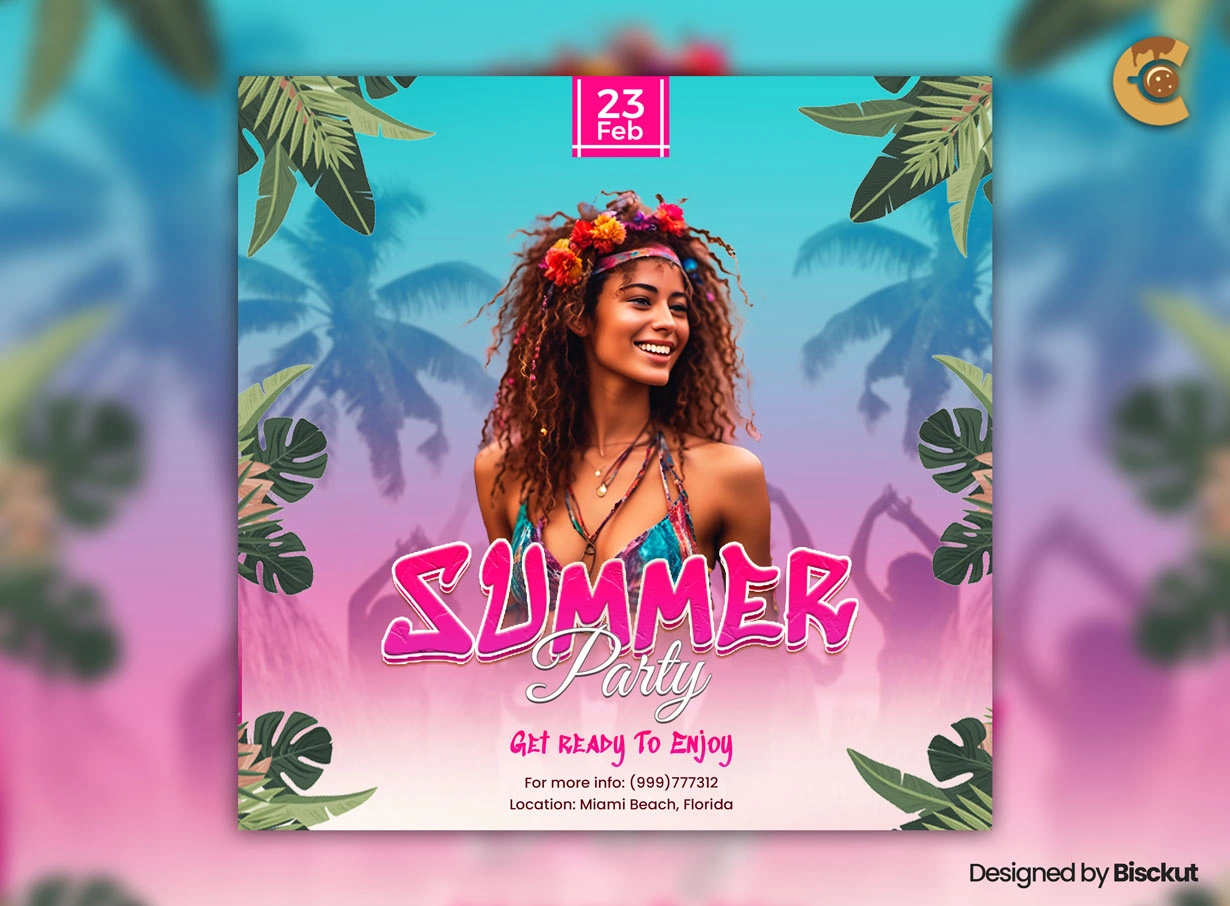
This Free Summer Party Vibrant Flyer PSD can be used as the starting point for an entire event campaign. Create the main announcement first, then reuse the same visual style for performer reveals, countdown posts, ticket reminders, and last-minute updates.
The PSD is prepared in RGB colour mode at 300 DPI and includes organised layers for editing text, colours, and images in Adobe Photoshop. Its bright, energetic style works well for beach parties, club events, poolside celebrations, and tropical festivals.
Turn One Flyer Into a Small Campaign
Instead of posting the exact same artwork several times, create a few versions from the master PSD.
The first version can announce the event. Another can focus on the featured DJ or performer. A later version can highlight ticket information, and the final post can remind people that the event is happening soon.
Because every version starts from the same design, the campaign stays visually connected without becoming repetitive.
Key Features
- Fully editable PSD flyer
- RGB colour mode
- 300 DPI resolution
- Vibrant summer design
- Editable text and colours
- Replaceable images
- Well-organised Photoshop layers
- Suitable for digital event promotion
- Preview image not included
Best For
This flyer can be adapted for:
- Summer parties
- Beach festivals
- Poolside events
- Tropical club nights
- DJ parties
- Music events
- Resort celebrations
- Rooftop parties
- Seasonal promotions
- Weekend events
Designer Tip
Create the main event flyer first, then duplicate the PSD before making promotional variations.
Keep a few elements consistent across every version: the event name, main colours, typography, and logo placement. Change only the information that needs attention in each post.
For example:
- Announcement: Event name, date, and venue
- Performer Reveal: Artist or DJ as the main focus
- Countdown: Number of days remaining
- Final Reminder: Time, location, and entry information
This gives people new information each time while helping them recognise that every post belongs to the same event.
Choose Images That Can Handle the Design
The preview image is not included, so you’ll need to add your own.
Before choosing a photo, check whether it leaves enough room for the text. An image can look great on its own but become difficult to use once the event name, date, and other details are added.
Look for images with clear areas where typography can sit naturally. Also check the resolution before using the photo in the final artwork.
Images from sources such as Pixabay may have their own usage terms, so review the current licence for any image you add to a commercial project.
Keep a Master File
Before creating campaign variations, save one clean master PSD with the final colours, fonts, logo, and basic event information.
Don’t overwrite it with the countdown or last-call version.
A clean master makes it easier to create new promotional graphics later and reduces the chance of accidentally using an outdated date, image, or piece of information.
Using the Flyer Digitally
The file uses RGB colour mode, making it naturally suited to screen-based promotion.
Use it for social media graphics, event announcements, email campaigns, website banners, and other digital marketing. When adapting the artwork to different platform sizes, rearrange the elements rather than simply stretching the entire flyer.
Check every version on a phone before publishing. Most people will see event promotions on a smaller screen.
Preparing the Design for Print
The PSD is created at 300 DPI, but resolution alone doesn’t make a file ready for every printing service.
If you plan to produce physical flyers or posters, confirm the required colour profile, dimensions, bleed, and export format with your printer. The RGB file may need to be converted according to their specifications.
Bright colours can also change when moved from a screen to paper, so consider checking a proof before a large print run.
Technical Details
- File Format: PSD
- Colour Mode: RGB
- Resolution: 300 DPI
- Design Style: Vibrant summer event
- Editable Elements: Text, colours, and images
- Layer Structure: Well organised
- Software Required: Adobe Photoshop
- Preview Image: Not included
- Image Source in Preview: Pixabay
This vibrant summer party flyer can do more than announce an event once. Build the main design, keep a clean master PSD, and turn the same visual identity into a series of promotional graphics that keeps the event visible from the first announcement to the final reminder.

Reviews
There are no reviews yet.