
Description
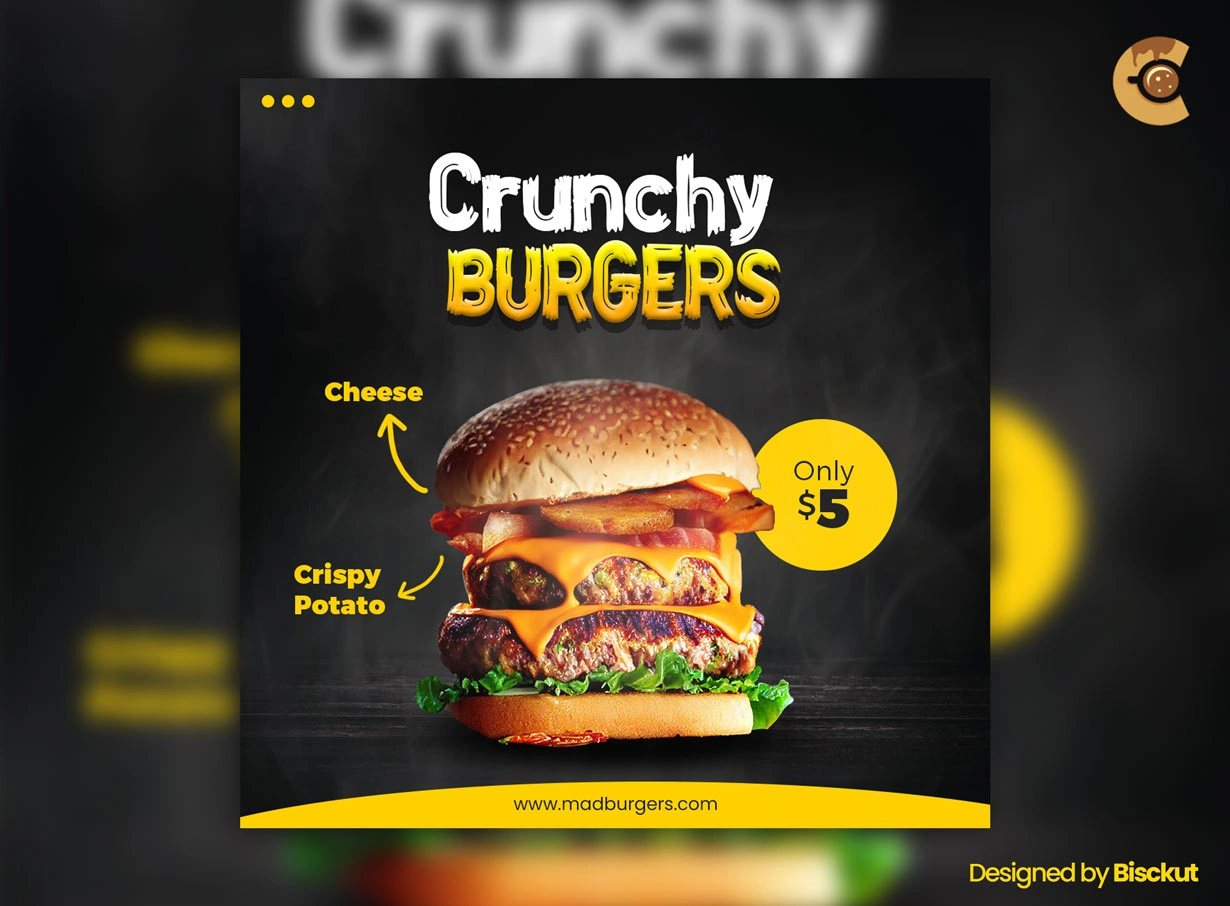
A food poster has one main job: make the dish look worth ordering.
This Free Food Poster Template PSD gives restaurants, cafés, food trucks, and delivery businesses a clean starting point for digital promotions. The layout can be customised with your own food photography, offer details, prices, colours, and branding in Adobe Photoshop.
Created in RGB colour mode, the template is naturally suited to social media ads, online campaigns, website graphics, and other screen-based promotions.
Let One Dish Lead the Design
Trying to show the entire menu in one poster usually weakens the promotion.
Choose one hero item whenever possible.
It could be your bestselling burger, a new coffee, a seasonal dessert, or the meal included in a special offer. Give that item enough visual space to create appetite and attention.
Supporting information can explain the offer, but the main food image should make people stop first.
Key Features
- Fully editable PSD template
- RGB colour mode
- Food-focused promotional layout
- Smart Object support
- Editable text and branding
- Replaceable food images
- Organised Photoshop layers
- Suitable for digital marketing
- Free for personal and commercial use
Best For
This template can be adapted for:
- Restaurant promotions
- Café offers
- Food delivery campaigns
- Menu highlights
- Special discounts
- New dish launches
- Food festival promotions
- Social media ads
- Combo meal offers
- Seasonal food campaigns
Designer Tip
Choose the food photo before choosing the colours.
The image already contains a palette.
A burger may bring warm browns, reds, and golden tones. A fresh salad may introduce greens and lighter colours. A dessert could have softer creams, chocolate tones, or bright fruit accents.
Pull one or two colours from the actual dish and use them in the typography or supporting graphics.
This usually creates a more connected design than forcing the food photo into an unrelated brand palette.
Use Food Photography That Looks Ready to Eat
The preview images are not included, so you’ll need to add your own.
Choose a photo with clear texture and good lighting. The food should look fresh, recognisable, and properly exposed.
Check the details people associate with appetite:
- Crisp edges
- Fresh ingredients
- Visible texture
- Natural highlights
- Good colour
- Clear separation from the background
Heavy filters can make food look artificial. If the image needs editing, protect the natural colours of the dish.
Don’t Make the Discount the Entire Poster
A large “50% OFF” message can attract attention, but people still need to know what they’re buying.
Keep the offer connected to the food.
Instead of showing a huge discount with a tiny product image, create a relationship between the dish, the offer, and the price. The audience should understand the promotion without searching through the poster.
If there are conditions—such as selected items, minimum order, specific dates, or online-only availability—include them clearly.
Price Needs Context
A price by itself can be confusing.
Make it clear whether the number refers to one item, a combo, a starting price, or a limited-time deal.
For example, a meal offer should visually connect the price with everything included in that meal.
Don’t place multiple prices around the design without a clear order. Too many competing numbers can make the poster feel like a menu board instead of a focused promotion.
Make the Call to Action Specific
“Order Now” works only when people know how to order.
Add the relevant next step:
- Website
- App
- Phone number
- QR code
- Delivery platform
- Store location
Use the method that actually matches the campaign.
A beautiful food poster that doesn’t tell people what to do next leaves the promotion unfinished.
About the Font and Images
The Alexaniri font used in the preview is not included.
If you don’t have access to the original typeface, choose a replacement that fits the same role in the layout. Check the spacing and line breaks after changing fonts, as different typefaces can alter the composition.
The preview images are credited to Pixabay and are also not included. Add your own properly licensed images and review the current usage terms of any third-party content used in commercial work.
Using the Poster Online
The PSD uses RGB colour mode, making it well suited to digital promotion.
Use the finished artwork for social media campaigns, website graphics, online advertisements, food delivery promotions, and other screen-based marketing.
Before publishing, view the design on a phone. Make sure the dish still looks clear and the offer, price, and call to action remain easy to read.
Technical Details
- File Format: PSD
- Colour Mode: RGB
- Design Style: Food and restaurant promotion
- Editing: Smart Objects and layered elements
- Editable Elements: Images, text, colours, and branding
- Software Required: Adobe Photoshop
- Font Used in Preview: Alexaniri, not included
- Preview Images: Pixabay images, not included
- License: Free for personal and commercial use
This food poster works best when the promotion stays focused. Choose one dish to lead the design, build the colours around the food photography, explain the offer clearly, and give customers an obvious next step.

Reviews
There are no reviews yet.